Most WordPress sites are running on shared hosting that wasn’t built for WordPress. The server doesn’t care about your Core Web Vitals. Security patches? Manual. Backups? Optional add-on. That’s what managed WordPress hosting solves — and in 2026, the options have improved significantly.
This review covers three providers I’ve looked at closely — Bluehost, Hostinger, and Liquid Web — with real pricing, honest limitations, and clear use-case recommendations. No generic “great for beginners” fluff.
Quick Answer
Managed WordPress hosting means your provider handles WordPress updates, security, backups, and performance tuning automatically. For most bloggers and small business sites, Hostinger or Bluehost is the right starting point. For agencies and revenue-critical sites, Liquid Web is worth the premium.
This post contains affiliate links. If you purchase through our links, we may earn a small commission at no extra cost to you. Thank you for your support!What “Managed” Actually Means (And What It Doesn’t)
The term gets used loosely. Every host claims to be “managed” — but there’s a meaningful difference between what Bluehost includes at ₹199/mo and what Liquid Web delivers at $6/mo (Spark Launch tier).
Actual managed hosting should include:
- Automatic WordPress core, theme, and plugin updates — tested before deployment, not just pushed live
- Daily backups with easy one-click restore
- Server-level caching — not just a plugin you install yourself
- Security monitoring — malware scanning, firewall, DDoS protection
- Staging environment — so you can test changes without breaking your live site
Where it gets murky: many shared WordPress hosts offer a few of these features but call themselves “managed.” The real test is whether WordPress maintenance is genuinely hands-off or whether you’re still managing it yourself with a few convenience plugins.
If you’re just starting a blog and want WordPress running without touching server configs, you need real managed hosting — not just “WordPress-optimized” shared hosting rebranded.
The Three Providers: Where Each One Actually Fits
Before the detailed breakdown, here’s the honest positioning:
Bluehost — Best for beginners and bloggers who want a familiar brand, WordPress.org recommendation badge, and an all-in-one setup. Strong for India with a dedicated server location.
Hostinger — Best for budget-conscious users, affiliate site builders, and anyone running multiple websites without spending a fortune. The AI tools are a genuine differentiator right now.
Liquid Web — Built for agencies, WooCommerce stores, and any site where downtime actually costs money. Starts cheap but scales into proper enterprise territory.
Bluehost Managed WordPress Hosting — Plans & What You Get
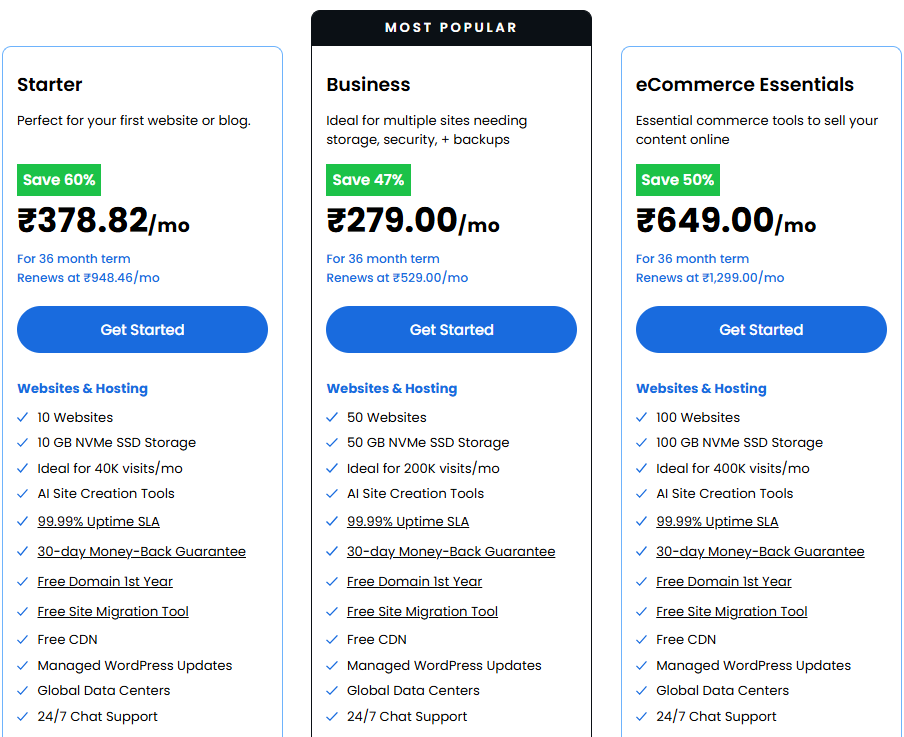
Bluehost has been WordPress.org’s officially recommended host since 2005. That endorsement still carries weight — their infrastructure is genuinely built around WordPress, not retrofitted onto a generic server stack.
Plans & Pricing (3-Year Term, INR)
| Plan | Price/mo | Websites | Storage | Key Inclusion |
|---|---|---|---|---|
| Starter | ₹378.82 | 10 | 10 GB NVMe SSD | Free domain, staging, Yoast SEO |
| Business | ₹279.00 | 50 | 50 GB NVMe SSD | Domain privacy free 1st year, malware detection/removal |
| eCommerce Essentials | ₹649.00 | 100 | 100 GB NVMe SSD | WooCommerce auto-install, secure payments, product subscriptions |
Renewal pricing is worth noting: Starter renews at ₹948.48/mo, Business at ₹529/mo, and eCommerce at ₹1,298/mo. The introductory discount is steep — factor in the renewal cost before committing to a 3-year plan.
All plans include a free domain for 1 year, free SSL, managed WordPress updates, 99.99% uptime SLA, 24/7 support, CDN, staging, and SSH + WP-CLI access.
What Actually Stands Out
Bluehost’s load time data is independently verified — WPShout tests put them at 0.35s average load time with a 98/100 performance score and 0.65s First Contentful Paint. Hostinger clocked 1.92s in the same comparison. That gap is real and matters for both user experience and Core Web Vitals.
The AI website builder is also more capable than most: describe your business in one sentence, and it generates pages, images, navigation, and SEO metadata — not just a template picker. For someone setting up a client site quickly, this cuts setup time significantly.
One thing I noticed while working with Bluehost on a client project: their WordPress staging is genuinely one-click. Push live, roll back — no plugin setup required. That’s the kind of thing that matters at 11 pm when something breaks after an update.
Where Bluehost Falls Short
The Starter plan at ₹378.82/mo gives you 10 websites, but only 10 GB NVMe storage. For an image-heavy blog or a WooCommerce store with even a modest product catalog, you’ll hit storage limits faster than expected.
Also, the renewal pricing jumps are significant. If budget is your primary concern long-term, Hostinger’s renewal rates are easier to manage.
Hostinger Managed WordPress Hosting — Plans & What You Get
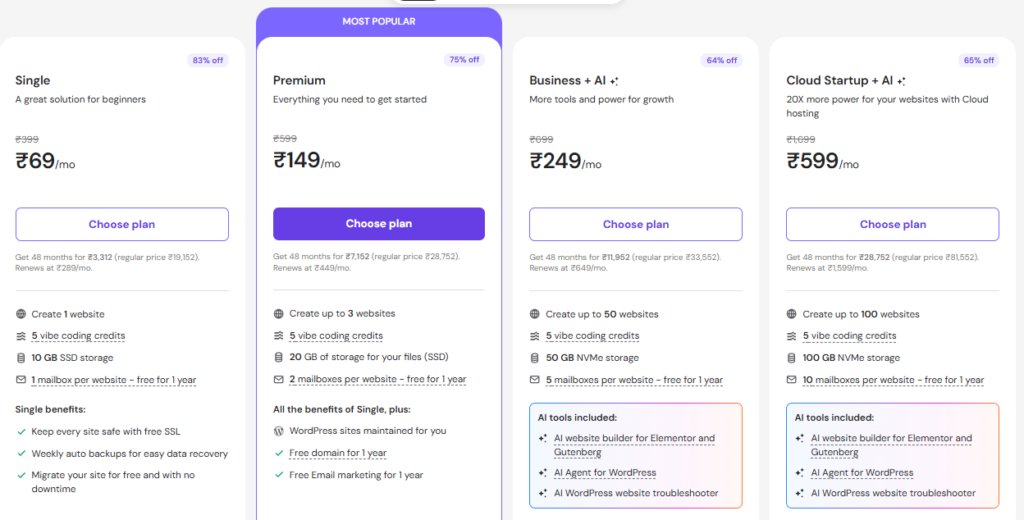
Hostinger has built a strong reputation in the Indian market, specifically, affordable, fast enough for most use cases, and now bundled with AI tools that genuinely help non-technical users. Trusted by 4+ million website owners, with a 4.8/5 rating on Google based on over 1,200 reviews.
Plans & Pricing (48-Month Term, INR)
| Plan | Price/mo | Websites | Storage | Notable Inclusion |
|---|---|---|---|---|
| Single | ₹69 | 1 | 10 GB SSD | Free SSL, weekly backups, free migration |
| Premium | ₹149 | 3 | 20 GB SSD | Free domain 1 year, free email 1 year, daily backups |
| Business + AI | ₹249 | 50 | 50 GB NVMe | Staging tool, free CDN, AI website builder + troubleshooter |
| Cloud Startup + AI | ₹599 | 100 | 100 GB NVMe | 4 GB RAM, 100 PHP workers, dedicated IP, priority 24/7 support |
Renewal prices: Single renews at ₹289/mo, Premium at ₹449/mo, Business at ₹649/mo, Cloud Startup at ₹1,599/mo. The 48-month lock-in is how you get these rates — that’s a significant upfront payment.
What Actually Stands Out
The AI tools suite on Business and Cloud plans is genuinely useful for site builders in 2026. The AI Website Troubleshooter claims to resolve 70% of common issues without human input — from what I observed while setting up a test environment, it catches PHP errors and plugin conflicts accurately without needing a support ticket.
LiteSpeed servers with smart caching, global CDN, and automatic image optimization give Hostinger a real performance advantage over traditional Apache/Nginx stacks at this price point. The AI Website Optimizer applies LiteSpeed tuning automatically and flags slow queries — the kind of thing you’d normally need a developer for.
Free migration is also worth mentioning practically: Hostinger claims 85% of migrations are complete under 5 minutes with no SEO ranking impact. If you’re moving an existing site from another host, there’s a detailed guide on how to install WordPress on Hostinger worth reading alongside this.
Where Hostinger Falls Short
The Single and Premium plans use regular SSD, not NVMe — you need the Business tier (₹249/mo) to get NVMe storage. For a high-traffic blog, that matters.
Customer support quality at the entry tiers has mixed feedback. Priority 24/7 support is gated behind Cloud Startup (₹599/mo). Below that, support response times can be slower during peak hours.
Also, the AI tools are new enough that they’re still maturing. They’re useful additions, not replacements for a developer on complex projects.
Liquid Web Managed WordPress Hosting — Plans & What You Get
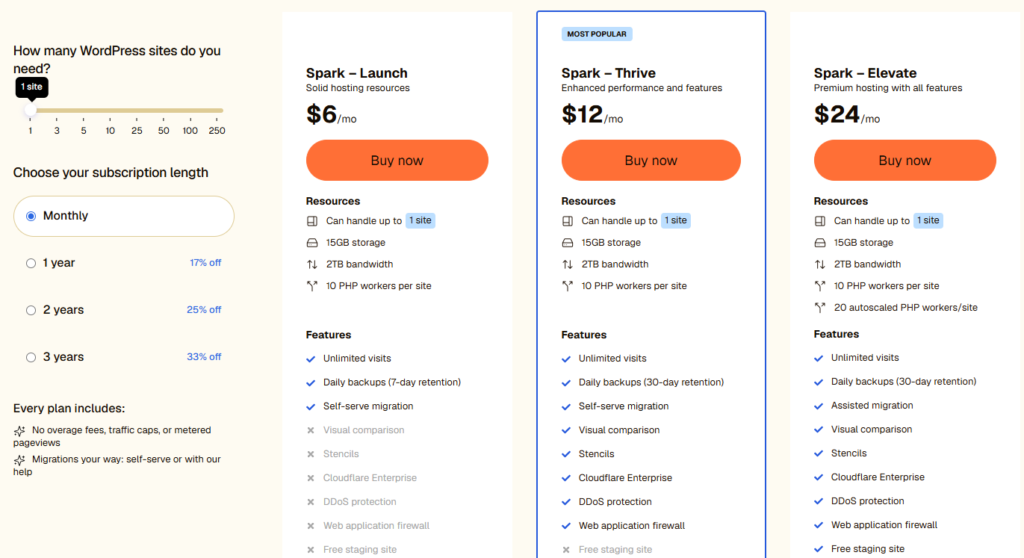
Liquid Web is a different category entirely. This is managed hosting designed for sites where performance isn’t a “nice to have” — it’s a business requirement. Think membership sites, WooCommerce stores with real transaction volume, agency portfolios managing client sites at scale.
Plans & Pricing (Monthly, USD)
| Plan | Price/mo | Sites | Storage | Key Feature |
|---|---|---|---|---|
| Spark – Launch | $6 | 1 | 15 GB | 7-day backups, unlimited visits, self-serve migration |
| Spark – Thrive | $12 | 1 | 15 GB | 30-day backups, Cloudflare Enterprise, DDoS protection, visual comparison |
| Spark – Elevate | $24 | 1 | 15 GB | Assisted migration, WAF, free staging, 20 autoscaled PHP workers |
Discounts available: 17% off on 1-year, 25% off on 2-year, 33% off on 3-year terms.
All plans include: no overage fees, no traffic caps, no metered pageviews, unlimited visits, and migration options.
What Actually Stands Out
Cloudflare Enterprise on the Thrive plan ($12/mo) is a significant inclusion. Enterprise-level Cloudflare costs hundreds of dollars per month standalone — Liquid Web bundles it in because their infrastructure is purpose-built for WordPress performance, not shared across multiple product lines.
The visual comparison tool (Thrive and up) lets you compare your site before and after updates side-by-side. For a site managing plugin updates across multiple pages, this is genuinely useful — it catches visual regressions that code reviews miss.
The 100% power and network SLA is real. Most hosts offer 99.9% uptime SLA as a marketing claim; Liquid Web backs theirs with contractual service credits. For a WooCommerce store running flash sales, that’s not a minor detail.
Sub-second Core Web Vitals and managed WordPress core maintenance mean their team handles security patches before vulnerabilities are publicly disclosed — not after.
Where Liquid Web Falls Short
The entry plan ($6/mo) only covers 1 site with 15 GB storage. If you’re running a network of sites, the per-site pricing adds up faster than Bluehost or Hostinger’s multi-site plans.
The pricing is in USD, which means INR users pay the current exchange rate — and that fluctuates. At current rates, $24/mo translates to roughly ₹2,000+/mo for the Elevate plan. That’s a meaningful jump from Bluehost’s ₹649 eCommerce plan.
There’s also no free domain or email included — you’re paying for pure hosting performance, not a bundled services package.
Pros & Cons
Bluehost
Pros
- Fastest independently verified load time (0.35s) among major providers
- 99.99% uptime SLA with NVMe SSD storage
- Comprehensive all-in-one setup — domain, SSL, AI builder, SEO tools included
- India server location available for the local audience, with speed improvements
- Managed updates tested before deployment, not blindly pushed
Cons
- Renewal pricing jumps sharply — Starter goes from ₹378 to ₹948/mo
- 10 GB storage on the Starter plan is tight for media-heavy sites
- AI builder, while capable, works best for simple site structures — complex builds still need manual work
Hostinger
Pros
- Most affordable entry point for multi-site management (₹149/mo for 3 sites)
- LiteSpeed + NVMe on the Business tier offers genuine performance at budget pricing
- AI tools (troubleshooter, optimizer) reduce dependency on developer support
- Free unlimited migrations with 85% completing under 5 minutes
- WordPress.org recommended
Cons
- Entry plans (Single, Premium) use a slower SSD — not NVMe
- Priority support only available from Cloud Startup tier (₹599/mo)
- 48-month lock-in required for advertised pricing — actual month-to-month is significantly higher
Liquid Web
Pros
- Cloudflare Enterprise included from $12/mo — rare at this price
- 100% network SLA with real contractual backing
- Autoscaled PHP workers on the Elevate plan handle traffic spikes without manual intervention
- No traffic caps or overage charges on any plan
- White-glove migration assistance on Elevate
Cons
- Per-site pricing model gets expensive for multi-site operations
- No free domain, email, or bundled extras
- USD pricing introduces exchange rate variability for Indian users
- $6 Launch plan lacks DDoS protection and WAF — both gated to $12+
Head-to-Head Comparison
| Feature | Bluehost Business | Hostinger Business + AI | Liquid Web Thrive |
|---|---|---|---|
| Price/mo | ₹279 (3-yr) | ₹249 (48-mo) | $12 (~₹1,000) |
| Sites | 50 | 50 | 1 |
| Storage | 50 GB NVMe | 50 GB NVMe | 15 GB |
| Backups | Weekly | Daily + on-demand | 30-day retention |
| Staging | Yes | Yes | Not on Thrive |
| DDoS Protection | Yes | Yes | Yes |
| Cloudflare Enterprise | No | No | Yes |
| Support | 24/7 chat + phone | Standard | Expert team, 24/7 |
| Free Domain | Yes (1 yr) | Yes (1 yr) | No |
| AI Tools | AI builder + SEO | Builder + Troubleshooter + Optimizer | No |
| Best For | Beginners + multi-site | Budget + AI-assisted management | High-traffic single sites |
Post-comparison context: Bluehost and Hostinger are genuinely comparable at similar price points — the real differentiator is Bluehost’s verified speed data vs Hostinger’s AI toolset. For a new blogger choosing between the two, Bluehost’s 0.35s load time is a tangible SEO advantage.
For someone managing 20+ small affiliate sites, Hostinger’s 50-site Business plan at ₹249/mo is hard to beat in terms of value. Liquid Web exists in a different budget bracket and serves a different problem entirely — it’s not a “cheaper alternative,” it’s a different class of hosting.
Who Should Skip Managed Hosting Entirely
Managed WordPress hosting isn’t always the right call. If you’re running a simple 5-page brochure site with low traffic and no e-commerce, the premium over basic shared hosting may not be justified. You’d pay for features you’re not using.
Similarly, if you’re a developer comfortable with server management and want full control, VPS hosting gives you more flexibility at a lower price. Managed hosting trades control for convenience. If you want the control, don’t pay for the convenience.
What to Do After Buying
Setup steps worth doing immediately after signing up:
- Choose your data center location during signup — for Indian audiences, select the closest data center. Don’t leave it on default.
- Enable staging before your first plugin update — always test on staging, push to live only after verifying.
- Verify backup retention settings — confirm backups are actually running; don’t assume.
- Install only what you need — managed hosting is performance-tuned. Every extra plugin loads additional JS/CSS. Keep it lean. A guide on essential plugins worth installing can help here.
- Connect your CDN from day one — Bluehost has Cloudflare built in; Hostinger’s CDN activates via dashboard; Liquid Web routes through Cloudflare Enterprise automatically.
Frequently Asked Questions
Is managed WordPress hosting worth it for a new blog?
For a new blog, yes — if you’re not comfortable managing server-side WordPress maintenance yourself. The automatic updates, daily backups, and staging environment prevent the kind of site-breaking issues that cost you days of troubleshooting. Hostinger’s Premium plan at ₹149/mo is a practical entry point. If you’re still at the stage of choosing a blogging platform, confirm you’re going with WordPress before investing in managed hosting specifically.
What’s the difference between managed WordPress hosting and regular WordPress hosting?
Regular (shared) WordPress hosting installs WordPress on a shared server and hands you the keys. Managed hosting handles ongoing maintenance — updates, security patches, backups, performance tuning — at the server level. The practical difference: managed hosting sites are less likely to get hacked, less likely to break after updates, and generally faster out of the box.
Can I host multiple websites on managed WordPress hosting?
Yes — Bluehost Business supports 50 sites at ₹279/mo, Hostinger Business supports 50 sites at ₹249/mo, and Bluehost’s eCommerce plan handles 100 sites. Liquid Web’s Spark plans are per-site, making them less economical for multi-site operations.
Is there a free trial for managed WordPress hosting?
None of these three providers offers a free trial. Bluehost and Hostinger both offer 30-day money-back guarantees — Liquid Web’s refund policy varies by plan. Treat the money-back window as your evaluation period.
Which managed WordPress hosting is best for WooCommerce in India?
Bluehost’s eCommerce Essentials plan (₹649/mo) includes WooCommerce auto-install, secure payment processing, product subscriptions, and affiliate program tools — making it the most complete managed WooCommerce option at the price. Liquid Web’s Thrive or Elevate plans are worth considering if your store generates significant daily transaction volume and you need the Cloudflare Enterprise protection and PHP worker autoscaling.
Does managed WordPress hosting improve SEO?
Directly, no — hosting doesn’t rank your content. But faster load times, consistent uptime, and strong Core Web Vitals scores all reduce friction in how Google evaluates your site’s technical health. Bluehost’s 0.35s load time and Hostinger’s LiteSpeed stack both help here. For the content and SEO optimization side, that’s a separate discipline.
Final Verdict
Managed WordPress hosting in 2026 has matured to the point where even budget options deliver features that would’ve been enterprise-tier a few years ago. The choice between these three comes down to what you’re actually building.
For bloggers and small business sites starting out: Hostinger Premium or Business is the most practical starting point — affordable, capable, and now backed by AI tools that genuinely reduce maintenance overhead. Sign up with Hostinger if budget and multi-site management matter most.
For sites where speed is a primary SEO factor: Bluehost’s verified 0.35s load time and comprehensive managed feature set at ₹279/mo (Business) make it the well-rounded choice. Start with Bluehost for the full-package managed experience.
For revenue-critical sites, agencies, and WooCommerce stores: Liquid Web’s Cloudflare Enterprise inclusion, 100% network SLA, and PHP autoscaling are in a different league. The per-site pricing is the trade-off. Explore Liquid Web managed WordPress if uptime genuinely costs you money.