Nextiva is running a Black Friday offer right now: the first 3 months free on its business phone, texting, chat and XBert AI receptionist. There is no coupon code. You claim it by signing up through the offer page.
Annual billing also cuts the per-user price by up to 50%, depending on the plan.
I’m Karan Rajput. I’ve spent 7+ years in blogging and client WordPress and SEO work. Below I cover how to claim the deal, what the free period includes, which plan suits an agency or freelance setup, and where Nextiva falls short.
Quick Deal Snapshot [🟢STATUS: LIVE NOW]
Starts on: Live now | Ends on: 28 November 2026. This date is calculated from the on-page countdown, which showed 9 days 3 hours left on 19 November 2026
Nextiva’s Black Friday offer gives new sign-ups 3 months free, with XBert AI included. Annual plans carry a separate discount of up to 50%.
- Offer: 3 months free on business phone, text, chat and XBert AI
- Promo code: None needed. You claim it through the offer form
- Annual discount: Up to 50% (NEXT Engage shows 50% off, NEXT Core shows 35%)
- Plans start at: $15/user/mo, billed annually (NEXT Core)
- Eligibility note: Annual small-business pricing is for new customers with 1–100 employees on a 12-month or longer term
Coupon: Not needed. 👇
This post contains affiliate links, and I earn a commission from them at no extra cost to you. Thank you for your support!Quick Answer
If you run a web agency, freelance business or SaaS company with a small team, the 3 free months are the real value here. They let you test calls, texts, and the XBert AI receptionist without paying for the first quarter. Annual pricing lowers the cost after that. Read the terms before you commit.
How to Claim the Nextiva Black Friday Deal
There’s no code to copy, so the steps are short.
- Open the offer page through this Nextiva link.
- Fill in the form. It asks for first and last name, work email, phone number, company name and number of employees.
- Click “Claim My Offer.” A Nextiva rep follows up. The page says seeing how NEXT works takes about 15 minutes.
- Choose your plan. Pick Annually on the pricing toggle, since that’s where the “save up to 50%” label appears.
- Check the terms. The page marks the offer “Terms & Conditions apply,” so read them before you sign.
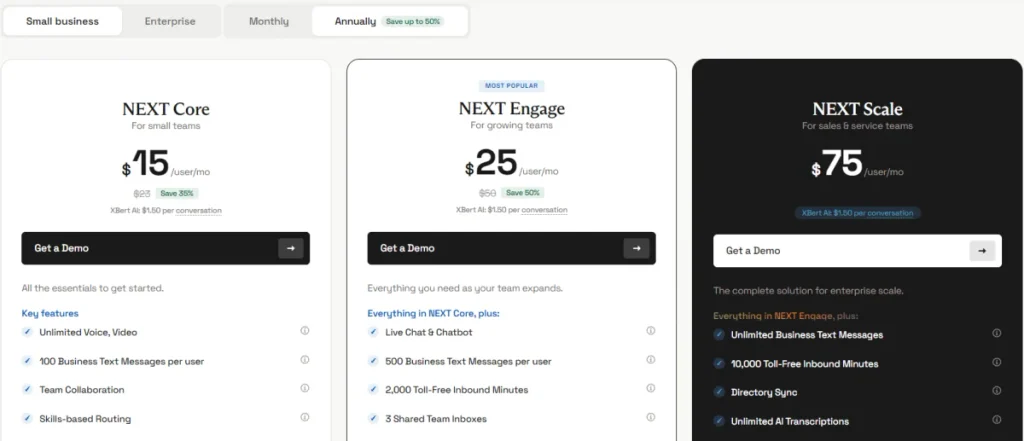
Here are the plans as shown on Nextiva’s pricing page (small business, annual billing, per user per month):
| NEXT Core | NEXT Engage | NEXT Scale | |
|---|---|---|---|
| Annual price | $15 (was $23, save 35%) | $25 (was $50, save 50%) | $75 |
| Business texts per user | 100 | 500 | Unlimited |
| Toll-free inbound minutes | Add-on | 2,000 | 10,000 |
| Shared inboxes | 1 shared + 1 personal | 3 shared + 1 personal | 10 shared + 1 personal |
| Live chat & chatbot | Not included | Included | Included |
| AI transcriptions / summaries | 50 each | 200 each | Unlimited |
| Best for | Solo or tiny team on calls | Growing agency needing chat | Larger sales and support teams |
XBert AI conversations are billed at $1.50 each on these plans. Nextiva also sells a separate XBert AI Employee package at $99 per month, with packages starting at 100 conversations a month, for teams that already have a helpdesk.
For a small agency, Engage looks like the sensible middle. Core has no live chat, and Scale only makes sense once your text and call volume is high. Nextiva’s page notes that add-ons can carry setup, licensing or usage fees.
What the 3 Months Free Actually Covers
According to the offer page, you get your first 3 months of Nextiva free, with XBert included at no extra cost. XBert is Nextiva’s AI receptionist, and it handles calls, texts and chats.
For an agency owner, this matters in practical ways:
- Call answering: XBert picks up, answers questions and books appointments
- Text replies: confirmations and reminders go out, and XBert answers customer replies
- One thread per customer: your team sees calls, texts, chat and email together, with an AI summary
What the pages don’t say: how many XBert conversations the free period covers, or what happens to billing on day 91. I’d ask this on the first call.
Is It Useful for Agencies, Freelancers and SaaS Founders?
Nextiva is built around client conversations, which is the angle that matters if you serve US or international clients remotely.
Here’s where I see the fit:
- US local or toll-free numbers for a professional business presence. Engage includes one toll-free number, and Scale includes three
- Client calls and texts from one business number, with call transcription and summaries
- Appointment booking, where XBert can book calls from phone, text or chat
- CRM and helpdesk sync with 30+ integrations. These include Salesforce, HubSpot, Shopify, Zendesk, Google Calendar and Cal.com
Where it could replace your stack
If you currently use separate apps for calls, texts and video meetings, Nextiva bundles all three in one place. If you’re already hunting for SaaS stack deals, you can also check the AppSumo Black Friday deal for other tools.
Consolidation has a catch. One bundle is easier to manage, but you lose the freedom to swap each tool independently.
What You Actually Get Inside Nextiva
Think of Nextiva as one business communication hub, a bit like Skype, but built around a proper business number. You call, text, chat and meet clients from one platform instead of juggling separate apps.
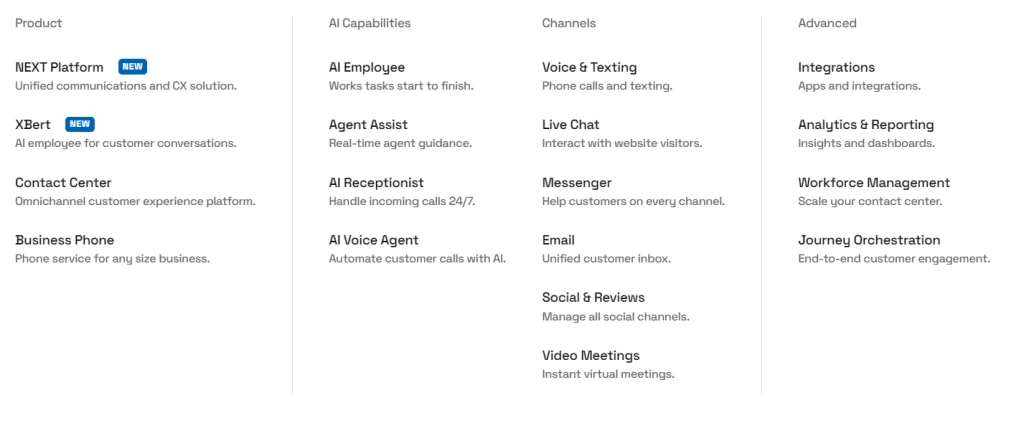
Based on Nextiva’s product menu, here is what sits inside:
- Voice & Texting: phone calls and business texting
- Video Meetings: instant virtual meetings
- Email: one unified customer inbox
- Messenger, Social & Reviews: manage conversations across other channels
- XBert and the AI Receptionist: handles incoming calls 24/7
- AI Voice Agent: automates customer calls with AI
- Agent Assist: real-time guidance for your team
- Integrations and Analytics & Reporting: CRM sync and dashboards
Why this matters for US and international clients: to talk to clients abroad, you need a proper business number. Engage includes 1 toll-free number and Scale includes 3, while Core treats it as an add-on. Nextiva’s footer also lists local phone numbers.
I couldn’t confirm which countries’ numbers are available or what international calling costs. Ask sales before buying if most of your clients are outside the US.
Pro observation: Pricing is per user, so the bill grows with headcount. XBert is billed per conversation. If you get many small client inquiries, the AI usage line can matter more than the seat price, so estimate your monthly volume before the free period ends.
Where It Falls Short (and Who Should Skip It)
Nextiva isn’t for everyone. These are the real drawbacks:
- No instant checkout visible. Most buttons say “Get a Demo,” so expect a sales conversation
- Annual lock-in. The lowest rates need a 12-month or longer term, and only for new customers with 1–100 employees
- Core has no Live Chat & Chatbot. If you want chat alongside calls and texts, you need Engage
- The “up to 50%” is not uniform. Scale shows no discount, and Core shows 35%
- Add-ons cost extra. Toll-free numbers, toll-free minutes and virtual fax are add-ons on Core
- US focus. The company is based in Arizona, and I couldn’t confirm number availability for other countries. Ask sales if your clients are outside the US
Who should skip it:
- Solo freelancers who make a few calls a month and don’t need chat or AI
- Anyone who wants to avoid annual contracts
- Teams needing numbers in specific non-US countries, until sales confirms availability
Is This the Lowest Price? A Reality Check
The “up to 50%” figure appears to be the annual-billing discount shown on Nextiva’s pricing page. I can’t confirm it’s exclusive to Black Friday, and I can’t verify Nextiva’s past sale history. So treat the 3 months free as the Black Friday-specific benefit.
The urgency is real but modest. The timer shows the offer ending around 28 November 2026, and the page says “offer ends soon.” If you’re already planning to buy, claiming it before then makes sense. If you’re not sure, don’t rush.
What to Do After Buying
Setup steps:
- Choose your main number (local or toll-free) and decide which team members need seats
- Connect your CRM or calendar through the integrations
- Set XBert’s guardrails, business hours and FAQs before letting it talk to anyone
- Connect your calendar and test one call and one text with a team member before going live
Key settings:
- Turn on call recording and transcription so you have records of client calls
- Set up handoff rules so urgent requests reach a person quickly
- Start with AI helping your team, then expand to after-hours coverage
Mistakes to avoid:
- Switching on AI for every channel on day one
- Forgetting to note the date the free period ends
- Buying Core and later realizing you need chat
- Not asking sales about international number availability before buying

Nextiva Black Friday Deal
Deal: Up to 50% Off + 3 Months Free
Coupon Code: Not needed.👇
Frequently Asked Questions
Is there a Nextiva Black Friday promo code?
No. The offer page I reviewed shows a sign-up form, not a coupon field. You claim the 3 months free by submitting the form through the Black Friday page. Nothing needs to be entered manually.
When does the Nextiva Black Friday deal end?
The on-page countdown showed 9 days 3 hours remaining on 19 November 2026, which puts the end around 28 November 2026. Check the live timer on the page, since the exact cut-off time depends on your time zone.
Do I need a credit card to claim it?
The pricing page says no credit card is required for a demo. I couldn’t see whether payment details are needed to start the free period, so check the Terms & Conditions linked on the offer page.
Does the 50% discount apply to all plans?
No. NEXT Engage shows 50% off, NEXT Core shows 35%, and NEXT Scale shows no discount. Annual pricing is for new small-business customers with 1–100 employees on a 12-month or longer term.
Which plan is best for a small agency?
NEXT Engage is the practical pick. It adds live chat and a chatbot, more business texts, a toll-free number, and three shared inboxes. Core works only if you need calls and basic texting.
Will XBert cost extra after the free period?
The pricing page shows XBert billed per conversation, and a separate XBert AI Employee package for helpdesk users. Ask sales how the free period handles AI usage and what billing looks like afterward.
Does Nextiva work with my CRM and calendar?
Nextiva’s offer page lists 30+ integrations. These include Salesforce, HubSpot, Zendesk, Shopify, Google Calendar and Cal.com. Check the full list before buying, since I couldn’t confirm which integrations are available on each plan.
Final Verdict
For agency owners, freelancers and SaaS founders handling client calls, texts and chat, this deal is worth a look. The 3 free months let you test XBert, call transcription and chat in a real workflow before paying. NEXT Engage is the plan most small teams will need.
Just read the terms, especially annual commitment and AI usage billing. If it fits, claim the Nextiva Black Friday offer here before it ends around 28 November.
Related Posts