Reno Product Gallery Pro is a WooCommerce plugin that upgrades your product images, variation images, zoom, lightbox, and product videos.
The Black Friday sale takes 50% off every plan, yearly and lifetime. No code to type, the discount applies in the cart on its own.
Below you’ll find the exact plans, claim steps, and an honest take on who should buy and who should skip.
Quick Deal Snapshot [🟢STATUS: LIVE NOW]
Starts on: November 13, 2026 | Ends on: December 11, 2026, 11:59 PM ET
Deal Active Now
- Discount: 50% off on all Yearly and Lifetime plans
- Yearly: Single Site $44.50/year | 5 Sites $94.50/year | Unlimited Sites $149.50/year
- Lifetime: Single Site $189 | 5 Sites $289 | Unlimited Sites $499 (one-time)
- Coupon: Auto-applied at checkout
- Refund: 14-day money-back guarantee
- Validity note: Prices return to normal when the sale ends
Coupon: Not needed. The discount is auto-applied at checkout. 👇

This post contains affiliate links, and I earn a commission from them at no extra cost to you. Thank you for your support!Quick Answer
If you run a WooCommerce store and your product pages still use the default gallery, this is a decent time to upgrade. The discount is flat 50%, the code applies itself, and there’s a 14-day refund window. Pick Lifetime if you’ll use it for years, Yearly if you want to test it cheaply first.
How to Claim the Reno Product Gallery Pro Discount
Takes about two minutes.
- Open the Reno Product Gallery Pro deal page. The sale banner and countdown should be visible at the top.
- Use the Yearly / Lifetime toggle above the plan cards.
- Choose your plan. Yearly: Single Site at $44.50/year, 5 Sites at $94.50/year, Unlimited Sites at $149.50/year. Lifetime: Single Site at $189, 5 Sites at $289, Unlimited Sites at $499.
- Click Buy now.
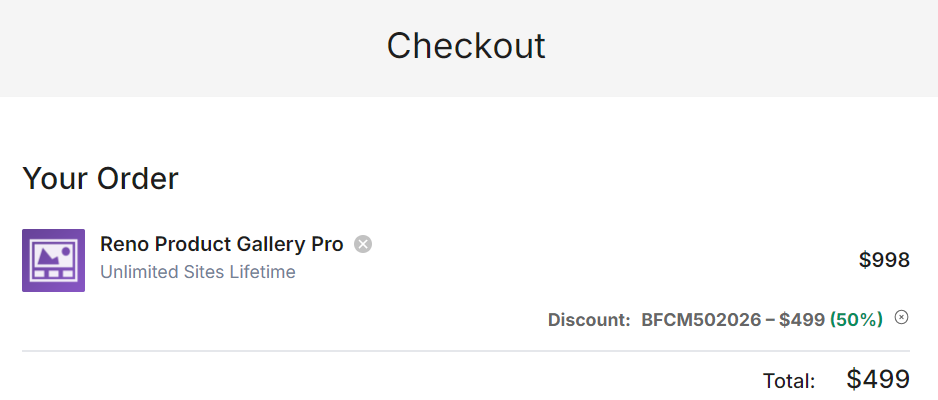
- On the checkout page, check the discount line. The 50% coupon is auto-applied, so you don’t need to enter anything. In the checkout I looked at for the Unlimited Lifetime plan, the cart showed the original price, the coupon, and the halved total without any manual step.
- Complete payment. The page shows secure payment through Stripe, and PayPal also appears in the footer.
If the discount line is missing, refresh the page from the link above before paying. Don’t pay full price and hope for a fix later.
What You Actually Get With the Pro Version
Reno Product Gallery Pro is built around one job: making WooCommerce product pages feel less flat. From the official product page, the main pieces are:
- Product gallery layouts: the page mentions 16 unique layouts, and you can assign custom layouts to specific products and categories.
- Additional variation images: extra images per variation, so a colour change shows the right photos.
- Product videos inside the gallery: video sits alongside the images instead of a separate tab.
- Advanced image zoom: for products where buyers want to inspect texture or detail.
- Advanced lightbox: full-screen viewing of the gallery.
- Featured video on the shop page: product videos can show up in the shop archive too.
The category-level layout assignment is the one I’d pay attention to. A store selling shoes and a store selling accessories rarely need the same gallery style, and being able to set it per category saves manual work.
Yearly or Lifetime: Which One Makes Sense?
Both billing types give you all Reno Product Gallery Pro features and the same 14-day guarantee. The difference is time.
- Yearly: support and updates last 1 year. After that, the licence needs renewal for continued support and updates.
- Lifetime: support and updates for life, with a single payment.
Here’s the simple way I’d think about it. A WooCommerce store you plan to run for 2+ years usually gets better value from Lifetime, since the yearly renewal keeps coming back. If you’re unsure the plugin fits your theme, the yearly plan is a lower-risk first step.
Since this is a 50% sale on both, the lifetime plan is simply the long-term version at the same discount level. It’s the sale most people hold off for.
Which Plan Fits Which Kind of User?
Plan limits are about sites and support level:
- Single Site: activation on 1 website, standard support. Fine for one store.
- 5 Sites: activation on 5 websites, priority support. This one carries the “Most popular” tag on the official page and suits freelancers and small businesses with a few client stores.
- Unlimited Sites: activation on unlimited websites, priority support. Built for agencies and developers.
If you work on client WooCommerce stores like I do, the 5 Sites plan is where the maths usually works out, because one licence covers multiple projects. A single store owner shouldn’t pay for more than Single Site.
A Developer’s Take on Product Gallery Plugins
I’ve been blogging since 2018 and building WordPress and WooCommerce projects for clients for years. The thing I look at first with any gallery plugin is what it does to the page’s loading behaviour.
Product images are usually the largest element on a product page, which makes them a common LCP candidate. Any plugin that adds zoom, lightbox, and video support also loads extra scripts and styles. That’s normal, but it’s worth checking.
My practical advice: install it on a staging copy first, then compare your product page speed before and after using PageSpeed Insights or Lighthouse. Check the gallery with your theme and with page builders like Elementor if you use one, since gallery plugins and builder-made product templates can clash. I haven’t seen published performance numbers for this plugin on the official page, so test rather than assume.
If you haven’t sorted your hosting yet, a slow server will hurt product images more than any plugin will. My Cloudways Black Friday deal post covers one option for managed WooCommerce hosting.
Pros and Cons
Pros
- 50% off on every plan, so there’s no need to hunt for a special tier to get the sale.
- Lifetime plans include lifetime updates and support, which removes renewal from your calendar.
- Coupon is auto-applied, so there’s no code to mistype or miss.
- Category and product-level layout assignment, useful for stores with different product types.
- 14-day money-back guarantee, which lets you test it on a real store.
Cons
- It’s WooCommerce-only. If your store runs on something else, or you want a general image gallery for blog posts, this isn’t the plugin.
- Yearly plans stop updating and support after 1 year. Miss the renewal and you’re running unsupported software on a live store.
- The Unlimited Lifetime plan is a large one-time payment, hard to justify unless you manage many stores.
- Standard support on Single Site, while priority support starts from the 5 Sites plan.
Who Should Skip This
Skip it if your default WooCommerce gallery already looks fine for your products, or if you sell only a handful of items where a better photo matters more than a better gallery. Also skip if your store is already struggling with page speed and you haven’t fixed the basics (hosting, image sizes, caching) yet. A gallery plugin won’t fix those.
Reno Product Gallery Pro in the WooCommerce Bundle
The official page also promotes a WooCommerce Bundle with 9 Pro plugins on a lifetime licence, and says it’s usually cheaper than buying two plugins separately. The bundle price is listed as $849 lifetime.
Use the ShapedPlugin bundle link if you want to see what’s inside. It makes sense if you were already planning to buy a second ShapedPlugin product. If Reno Product Gallery Pro is the only one you need, the bundle is extra spend you won’t use.
For related ShapedPlugin sale posts, see my WP Carousel Pro deal and Real Testimonials Pro deal, both useful for product page social proof and related-product displays.
What to Do After Buying
- Install on staging first, then activate your licence. Never test a new gallery plugin straight on a live store.
- Pick one layout and apply it to a single product category before rolling it out everywhere.
- Add variation images for your top-selling variable products first.
- Test zoom and lightbox on mobile. Most WooCommerce traffic is mobile, and touch behaviour is where gallery plugins often disappoint.
- Re-run a page speed test and compare it to your earlier numbers.
Mistakes to avoid: uploading oversized images and expecting the plugin to fix it, and enabling every gallery feature just because it exists.
If your store is still being built, check Storekit alongside this for other WooCommerce elements.

Reno Product Gallery Pro Black Friday Deal
Deal: 50% Off + Lifetime Plans
Coupon Code: Not needed. The discount is auto-applied at checkout.👇
Frequently Asked Questions
How long does the Reno Product Gallery Pro Black Friday sale last?
According to the official sale page, it runs from November 13 until December 11, 2026, at 11:59 PM ET. After that, prices go back to normal. If you’re planning a purchase, don’t wait for the last day, since checkout or payment problems are harder to sort out with a countdown running.
Do I need a coupon code for the Reno Product Gallery Pro discount?
No. The 50% discount is auto-applied at checkout. In the checkout I checked, the coupon appeared in the cart on its own, with the total already reduced. Just open the deal link, choose your plan, and confirm the discount line shows before you pay.
Which plan is best for a beginner with one store?
Single Site is enough. It activates on 1 website and includes all Pro features. Choose Yearly if you want to test the plugin first, or Lifetime if you’re confident you’ll keep the store running. You only need 5 Sites or Unlimited if you manage multiple stores.
Is the lifetime plan a subscription?
The lifetime plans are priced as one-time payments, and the page lists lifetime updates and lifetime support for them. Yearly plans work differently, with support and updates for 1 year. If you want to double-check licence terms, the official FAQ on the sale page covers this.
Does this discount apply to every plan?
Yes. Both the Yearly and Lifetime toggles show 50% off across Single Site, 5 Sites, and Unlimited Sites. The official page presents it as the biggest discount of the year on every plan.
Can I get a refund if the plugin doesn’t suit my store?
The official page advertises a 14-day money-back guarantee with no questions asked. Test it on your real store within that window, preferably on staging first, and contact the support team within 14 days if it doesn’t work for you.
Final Verdict
Reno Product Gallery Pro is a focused WooCommerce upgrade, and the 50% sale on every plan makes this a fair time to buy it. Single store owners should look at Single Site, freelancers with client stores should look at 5 Sites, and agencies can consider Unlimited. Lifetime is the better long-term deal, Yearly is the lower-risk trial. Test it on staging, check your page speed, and use the 14-day guarantee if needed. When you’re ready, claim the Reno Product Gallery Pro deal here before the sale ends on December 11.
Related Posts