If you run a WooCommerce store, you already know the problem. A shopper clicks a product, waits for a full page to load, hits Back, and loses their place in the catalog.
Reno Quick View Pro fixes that with a popup that shows product details right on the shop page. ShapedPlugin has put all three lifetime plans on a 60% Black Friday discount.
Here is the deal, how to claim it, and whether the Pro version is worth buying over the free one.
Quick Deal Snapshot [🟢STATUS: LIVE NOW]
Starts on: Live now | Ends on: Ends Soon
Deal Active Now
- Discount: 60% off all Reno Quick View Pro plans
- Plans: Single Site, Five Sites, Unlimited Sites (all lifetime, one-time payment)
- Lowest prices right now: Single Site $119 (regular $298), Five Sites $199 (regular $498), Unlimited Sites $319 (regular $798)
- Refund window: 14 days, no questions asked
Coupon: BFCM602026, applied automatically through the offer link 👇

This post contains affiliate links, and I earn a commission from them at no extra cost to you. Thank you for your support!Quick Answer
Reno Quick View Pro is a WooCommerce plugin that opens product details in a popup. During this sale, every lifetime plan is 60% off, and the coupon applies automatically through the link below. If you run one store, Single Site is enough. Agencies should look at Unlimited.
How to Claim the 60% Discount
This takes about two minutes.
- Open the Reno Quick View Pro offer page through my link. This is what applies the discount automatically.
- Choose the Lifetime tab on the pricing section. Pick Single Site, Five Sites or Unlimited Sites.
- Click Buy Now and go to checkout.
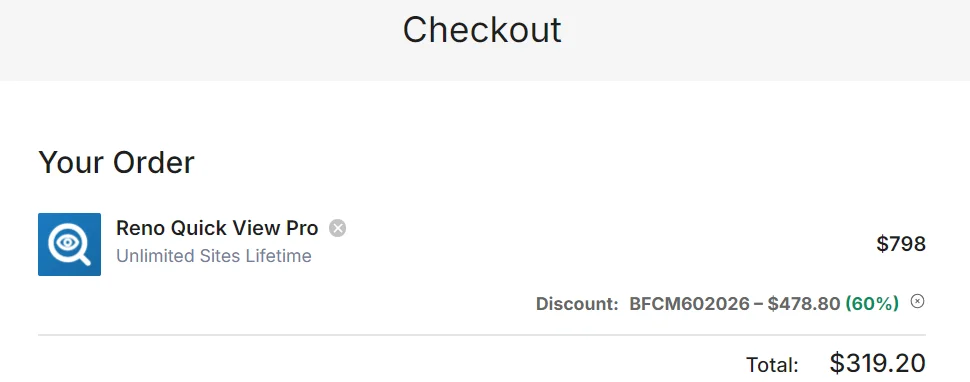
- Check the order summary. You should see the coupon BFCM602026 already applied, with the 60% reduction showing.
- Complete the payment. Stripe and PayPal are among the accepted methods shown on the page.
On the checkout I looked at for the Unlimited Sites plan, the regular $798 dropped by $478.80 to a total of $319.20. If the coupon line is missing on your screen, re-open the offer link in the same browser and try again before paying.
| Plan | Regular Price | Sale Price | Best For | Support |
|---|---|---|---|---|
| Single Site | $298 | $119 | Individuals | Standard, lifetime |
| Five Sites | $498 | $199 | Small business and freelancers | Priority, lifetime |
| Unlimited Sites | $798 | $319 | Agencies and developers | Priority, lifetime |
All three include every Pro feature, lifetime updates and a one-time payment. Pricing may change after the sale, so confirm on the official page before you pay.
Looking for more plugin deals this season? The ShapedPlugin Black Friday deal page covers the wider range.
What You Actually Get With Pro
Quick view sounds simple. The Pro version goes well beyond a basic popup.
Control over where the button sits. The Pro version offers many more button positions than the free plugin. You can place the button above or below Add to Cart, use a shortcode, or hide it on small devices if your mobile layout is already tight.
Shoppers can open it from more places. Free works with the button only. Pro lets customers open the popup by clicking the product name or image, and it also works on wishlist items.
Category-level control. You can limit quick view to specific categories. That matters if only some of your catalog needs a popup, say, products with many variations.
A popup that sells. Inside the modal you get variation swatches, a gallery with slider or classic thumbnails, zoom and lightbox, AJAX Add to Cart, a View Details button and social share buttons.
Browsing inside the popup. Customers can move to the next product, or products from the same category, without closing the modal. For stores with big catalogs, this is the feature I would care about most.
Design freedom. Pro has 55+ icon styles (the free version has 6+), a custom icon upload, custom CSS and JS fields, and styling for buttons, close icons and preloaders.
A Developer’s Take on Performance and Compatibility
Anything that loads extra scripts on a shop page can affect speed, so I always check this first.
From a performance standpoint, a quick view plugin adds a script, a stylesheet and AJAX calls when the popup opens. I have not benchmarked Reno Quick View on a live store, so I will not quote numbers. What I would do is install it on staging and run PageSpeed Insights before and after. Pay attention to LCP and CLS on archive pages, because the button and icons render in the product grid.
On compatibility, ShapedPlugin lists support for Gutenberg, Elementor, Divi, WPBakery, Avada, XTheme, BeTheme, Astra, Woostify and OceanWP, plus translation plugins like WPML, Polylang, Loco and qTranslate. If you are building on Astra, the Astra Theme Black Friday deal pairs naturally with a WooCommerce setup like this.
Pro observation: The Custom CSS and JS fields are easy to overlook. When a theme’s product card has unusual spacing, a few lines of CSS usually sorts it out without touching theme files, which keeps your child theme clean.
Also, fast hosting matters more than any quick view plugin. A popup that opens on a slow server will feel slow. If your TTFB is the problem, look at the Cloudways Black Friday deal before blaming the plugin.
Pros and Cons
Pros
- Lifetime license: One payment covers updates and support forever, so there is no renewal to track.
- Big upgrade over Free: 55+ icon styles, custom icon upload, and category filtering are all Pro only.
- Popup does real work: Variation swatches, gallery, AJAX Add to Cart and in-popup product navigation reduce clicks to purchase.
- Wide builder support: Works with Gutenberg, Elementor, Divi, WPBakery and popular themes.
- 14-day refund window: The guarantee covers a test on your own store.
Cons
- WooCommerce only: It does nothing for a blog, a membership site or an Easy Digital Downloads store.
- Upfront cost: A lifetime plan means paying everything at once, which can feel heavy for a store that is not yet making sales.
- Single Site gets standard support: Priority support starts from the Five Sites plan.
- Free may be enough for small shops: If you only need a basic button and a popup, Pro adds things you may never use.
Who should skip it: Anyone not running WooCommerce, or stores with fewer than a handful of products where a normal product page loads quickly and customers do not compare items.
Free vs Pro: What the Upgrade Changes
| Feature | Free | Pro |
|---|---|---|
| Quick view layouts | 1 | 5 |
| Button positions | 3 | 12 |
| Icon styles | 6+ | 55+ |
| Custom icon | Built-in icons only | Upload your own |
| Open popup from | Quick view button | Button, product name or image |
| Wishlist support | Not available | Quick view on wishlist items |
| Category control | Not available | Show only on chosen categories |
| Best for | Small stores testing the idea | Stores that want control over design and where the popup appears |
The difference shows up in layout control. Free is a good way to test whether quick view suits your customers. Pro is for stores where the popup is part of the shopping design and not just an add-on.
My recommendation: For a store with more than a few dozen products and a custom theme, go with Pro. The 12 button positions and category filter alone solve problems the free version cannot. For a small shop with a handful of products, install Free first and upgrade if you hit its limits.
Which Plan Should You Pick?
- Single Site: One store, standard support. Enough for most store owners.
- Five Sites: Freelancers and small agencies running a few client stores. Priority support is the real upgrade here.
- Unlimited Sites: Agencies with many WooCommerce clients. If you build stores regularly, this plan usually pays for itself on the third site.
Is there a hidden charge? Not that I could see. The page states it is a one-time payment, not a subscription, with updates and support included for life.
The ShapedPlugin lifetime bundle is another route if you need more than one plugin. Check the ShapedPlugin bundle page for what is included. If you also sell products with sliders or galleries, see the Reno Product Gallery Pro and Reno Product Slider Pro deals.
What to Do After Buying
- Download the Pro plugin from your ShapedPlugin account and install it. Activate your license key.
- Deactivate and remove the free version only after Pro is active, so your settings stay put.
- Pick the modal layout and button position first. Do these before styling.
- Turn on in-popup navigation and category filtering if your catalog is large.
- Test on mobile. Decide whether to disable quick view on small screens.
- Run PageSpeed Insights before and after, and clear your cache plugin.
Mistakes to avoid: Enabling every option at once, which crowds the popup. Forgetting to clear caching, which makes it look like settings did not save. And skipping the refund window: test it within the 14 days.
Reno Quick View Pro Black Friday Deal
Deal: Up to 60% OFF
Coupon Code: Not needed. The discount is auto-applied at checkout.👇
Frequently Asked Questions
Is the Reno Quick View Pro coupon applied automatically?
Yes, when you reach checkout through my offer link. The code BFCM602026 should already appear in the order summary with the 60% reduction. If you do not see it, open the link again in the same browser before paying.
Is Reno Quick View Pro a subscription or a one-time payment?
The lifetime plans are one-time payments. According to the official page, a lifetime license includes updates and support forever, with no renewal fee. Check the pricing tab shows Lifetime and not Yearly before buying.
Which plan is best for a beginner with one store?
Single Site. It includes every Pro feature, automatic updates and standard support. Move up to Five Sites only if you manage more stores or want priority support. All plans have the same features.
Can I get a refund if it does not suit my store?
ShapedPlugin offers a 14-day money-back guarantee with no questions asked. Install it on a staging or live site, test the popup with your theme, and request a refund within that window if it does not work for you.
Does it work with Elementor and my theme?
The official page lists support for Elementor, Divi, WPBakery, Gutenberg, Astra, Avada, BeTheme, OceanWP and more. If you use Elementor, read the Elementor Black Friday deal for plan options.
Is the free version enough?
For basic needs, yes. Free gives you a quick view button and popup. Pro adds more layouts and button positions, custom icons, category filtering, and quick view from product names, images or wishlists.
Final Verdict
Reno Quick View Pro is a practical upgrade for WooCommerce stores that want faster product browsing without extra page loads. At 60% off with a lifetime license, the sale makes sense if you manage more than a few products or build stores for clients. Small shops can start with Free and upgrade later. The 14-day refund window lowers the risk either way.
Claim the Reno Quick View Pro Black Friday offer here before the sale ends.
Related Posts