If your WooCommerce shop still shows categories as a plain list of text links, visitors have to work harder to find what they want.
Reno Product Category Pro fixes that with sliders, carousels and grids. Right now it’s 60% off on all plans, yearly and lifetime.
I’m Karan Rajput. I’ve been blogging and doing WordPress client work for 7+ years, so I look at deals like this through a store owner’s eyes and a developer’s eyes. Here’s what’s on offer and who it suits.
Quick Deal Snapshot [🟢STATUS: LIVE NOW]
Starts on: Already live | Ends on: Ends Soon
Deal Active Now
- Discount: 60% off on all Reno Product Category Pro plans
- Yearly plans (Single / Five / Unlimited Sites): $19.6 / $39.6 / $79.6 per year (regular $49 / $99 / $199)
- Lifetime plans (Single / Five / Unlimited Sites): $119 / $199 / $319 one-time (regular $298 / $498 / $798)
- Refund: 14-day money-back guarantee
Coupon: Not needed. The discount is auto-applied at checkout. 👇

This post contains affiliate links, and I earn a commission from them at no extra cost to you. Thank you for your support!Quick Answer
If you run a WooCommerce store with more than a handful of categories, this is a solid time to buy. The 60% discount applies to every plan, and the lifetime option removes renewal worries. If your store has five categories and no plans to grow, skip it and use the free version.
How to Claim the Reno Product Category Pro Discount
It takes about two minutes. Here’s the exact flow.
- Open the official Reno Product Category Pro deal page through this link.
- Toggle between Yearly and Lifetime, then pick your plan: Single Site, Five Sites or Unlimited Sites.
- Click Buy Now. The discount code is applied automatically at checkout.
- Check the order summary before paying. In the checkout I looked at, Unlimited Sites Lifetime showed $798, a 60% discount of $478.80, and a total of $319.20. The code shown as applied was BFCM602026.
- Complete the payment. The page lists PayPal, major cards and Stripe-secured payments.
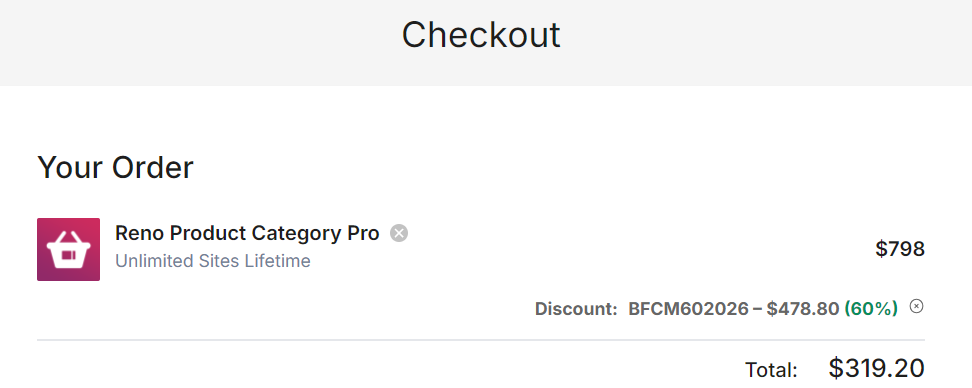
One thing I’d always check: the final total on the checkout screen, not just the pricing page. Pricing pages sometimes round numbers, and checkout is the only place the real figure shows up.
What You Actually Get With the Pro Version
Reno Product Category turns your WooCommerce product categories into visual showcases. The free version is limited. According to the official free-vs-Pro table, it offers 2 category layouts, while Pro offers 10+ (carousel, slider, grid, hierarchy grid, inline and more). It also shows parent categories only, while Pro handles parent, child, grandchild and great-grandchild categories.
That second point matters more than it sounds. If your store has nested categories (Men → Footwear → Sports Shoes → Running), the free version can’t show that structure.
Other Pro features listed on the official page:
- Show or hide specific categories, including empty ones, so you control what shows up
- Thumbnail controls like shapes (square, round, circle, custom radius), border, box shadow, padding and hover effects
- Slider options including navigation, pagination styles and device-wise responsive columns
- 915+ flat category icons as an alternative when you don’t have good category images
- “Shop Now” buttons, card-style categories and gradient backgrounds
- Shortcode generator with live preview, plus custom CSS and the option to enqueue or dequeue scripts to avoid conflicts
A Developer’s Take: Performance and Compatibility
Any plugin that adds sliders also adds JavaScript and CSS, and that can hurt LCP and CLS if it isn’t handled carefully. The vendor describes this plugin as lightweight and fast. That’s their claim, and I haven’t benchmarked it on a live store, so I’d treat it as something to verify on staging.
What I do like from a developer’s side:
- Script enqueue/dequeue control, which lets you stop assets from loading where you don’t use them
- Equal height option and fixed thumbnail sizes, which help avoid layout shifts when category images load
- Hard and soft crop on thumbnails, so you don’t serve oversized images in a small slider
Compatibility is listed with Gutenberg, Elementor and WooCommerce, plus other page builders and translation plugins named on the page. If you use something unusual, test it on a staging copy first. That’s standard advice for any slider plugin, and it takes ten minutes.
Which Plan Should You Pick?
All plans include all Pro features. The only differences are site count and support level.
| Single Site | Five Sites | Unlimited Sites | |
|---|---|---|---|
| Websites | 1 | 5 | Unlimited |
| Support | Standard | Priority | Priority |
| Updates | Automatic | Automatic | Automatic |
| Billing options | Yearly or Lifetime | Yearly or Lifetime | Yearly or Lifetime |
| Best for | One store, individuals | Freelancers, small business | Agencies, developers |
Five Sites carries the “Popular” tag on the official page, and it makes sense. If you manage even two client stores, it’s the better fit than buying Single Site twice.
For one personal store, go with Single Site. For a freelancer with a handful of clients, Five Sites is the sweet spot. For agencies, Unlimited Sites wins because support is priority and you never count licenses.
Yearly or Lifetime? The lifetime license includes updates and support for life as a one-time payment. That suits stores you plan to run for years. What I couldn’t confirm from the page is the renewal price of the yearly plan after the first year, so check that before assuming it stays at the sale rate.
If you want more than one ShapedPlugin product, look at the ShapedPlugin lifetime bundle too. Other ShapedPlugin sale pages are on the site, like Reno Quick View Pro and Reno Product Gallery Pro, which fit well with category displays on a WooCommerce store.
Pros and Cons
Pros
- 60% off on every plan, including lifetime, with the discount applied automatically
- 10+ layouts vs 2 in free, so you can actually match your store design
- Handles nested categories down to great-grandchild level, which is rare in a free-to-Pro jump
- 14-day money-back guarantee with no questions asked, so trying it has low risk
Cons
- Exact end date isn’t shown. The banner only says “Ends Soon,” so you can’t plan around a deadline
- It only solves category display. It won’t fix slow product pages, checkout or search
- Lots of settings. The backend has tabs for display, pagination, typography, thumbnails and slider navigation, which can feel heavy for beginners
- Free version may be enough if you only need a simple grid of top-level categories
Who Should Skip This Deal
Honestly, not everyone needs this.
Skip it if your store has under ten categories, you’re happy with your theme’s default category layout, or you’re not on WooCommerce. A bigger catalog with deep category trees is where this plugin earns its price.
Also be careful with the vendor’s headline stats, like the 72% average sales growth claim on the page. Treat that as marketing. Better category navigation can help shoppers find products faster, but results depend on your products, traffic and design.
What to Do After Buying
A few steps that save headaches:
- Install on staging first if it’s a live store, then push to production after checking mobile.
- Activate your license so one-click automatic updates work.
- Start with one layout. Don’t turn on every effect. Hover animations and sliders on every row will slow the page.
- Set thumbnail sizes before uploading more images, and regenerate thumbnails if needed.
- Test on mobile, because column settings are device-wise and defaults aren’t always ideal for your design.
A common mistake is stacking this with a heavy theme and several other slider plugins. If your theme is lightweight, like Astra, you’re starting from a better place. And good hosting matters just as much, so see my Cloudways Black Friday deal if you’re comparing options.

Reno Product Category Pro Black Friday Deal
Deal: Up to 60% Off + Lifetime Plans
Coupon Code: Not needed. The discount is auto-applied at checkout.👇
Frequently Asked Questions
Is there a free version of Reno Product Category?
Yes. A free version exists, but it’s limited to 2 category layouts and parent categories only. Pro adds 10+ layouts, child and grandchild categories, and extra styling. If your needs are simple, try the free one first before paying.
Is the coupon applied automatically?
Yes. The 60% discount is applied at checkout automatically. In the checkout I reviewed, the code showed as already applied on the order. Still, always confirm the discounted total on the checkout screen before you pay.
When does the Black Friday sale end?
The official banner says “Ends Soon” but doesn’t show an exact date. Since sales like this can close without much notice, I’d decide earlier rather than waiting. Check the official page countdown for the latest.
Is there a refund if I don’t like it?
Yes. The page promises a 14-day money-back guarantee with no questions asked. If the plugin doesn’t fit your store, you can ask for a full refund within 14 days of purchase.
Does Pro work with Elementor and Gutenberg?
The official page lists Gutenberg and Elementor among supported editors, along with WooCommerce. As always, test on staging if your site uses unusual theme or builder combinations.
Does the lifetime plan include updates?
Yes. According to the plan details, lifetime includes automatic updates and support for lifetime, as a one-time payment rather than a subscription. The current version on the page is 1.8.0, last updated July 30, 2026.
Final Verdict
For WooCommerce stores with many categories, Reno Product Category Pro at 60% off is a practical buy. Pick Five Sites if you handle client stores, Unlimited Sites if you’re an agency, and Single Site for one store. Lifetime suits stores you’ll run for years.
If your category list is short and simple, stay on the free version. Otherwise, the 14-day refund window makes it easy to test. You can grab the deal here while the sale is live.
Related Posts