Smart Tabs Pro, the plugin earlier known as WP Tabs, is running its Black Friday and Cyber Monday sale right now. Every plan, yearly and lifetime, is 50% off.
If your WooCommerce product pages are one long scroll of description, specs, FAQs and reviews, this plugin splits all of that into clean tabs. Below you’ll find what the deal includes, how to claim it, and who should actually buy.
The sale ends on December 11 at 11:59 PM ET.
Quick Deal Snapshot [🟢STATUS: LIVE NOW]
Starts on: November 13, 2026 | Ends on: December 11, 2026 (11:59 PM ET)
50% off every Smart Tabs Pro plan, with the coupon applied automatically at checkout.
- Discount: 50% off on all yearly and lifetime plans
- Lifetime plans: Single Site $149 | 5 Sites $249 | Unlimited Sites $399 (regular $298 / $498 / $798)
- Yearly plans: Single Site $24.50 | 5 Sites $49.50 | Unlimited Sites $99.50 per year (regular $49 / $99 / $199)
- Safety net: 14-day money-back guarantee
- Validity note: The sale page says prices go back to normal when the sale ends
Coupon: BFCM502026 (auto-applied, no manual entry needed) 👇

This post contains affiliate links, and I earn a commission from them at no extra cost to you. Thank you for your support!Quick Answer
If you run a WooCommerce store with long product pages, the 50% off on Smart Tabs Pro is a solid time to buy, because the official sale page itself calls it the plugin’s lowest price. Lifetime suits people who plan to keep stores running for years. If you only need tabs on one store for a year, yearly is cheaper to start.
How to Claim the 50% Off, Step by Step
You don’t need to hunt for a code here. The discount is applied automatically.
- Open the Smart Tabs Pro deal page through the link. The sale banner and countdown appear at the top.
- Use the toggle to pick Yearly or Lifetime.
- Choose your plan and click Buy now.
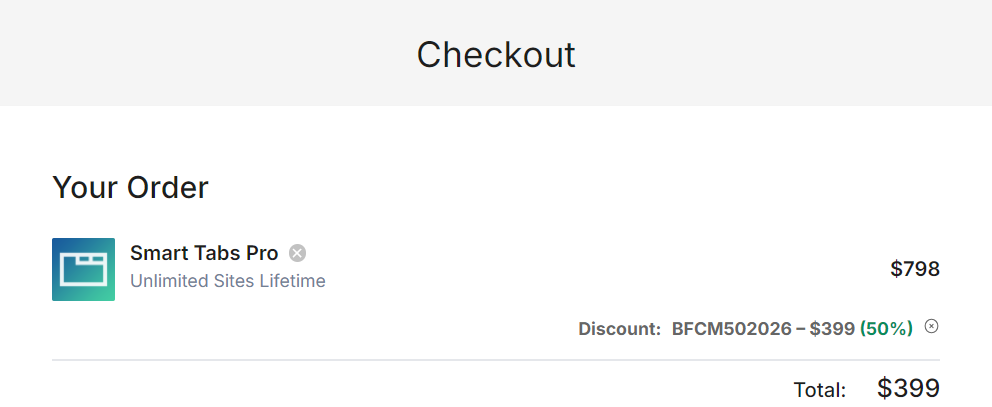
- At checkout, look at the order summary. You should see the discount line for BFCM502026 with 50% already subtracted.
- Pay and download the plugin from your account.
Here is a quick look at the plans so you can pick before you click.
| Plan | Best for | Lifetime (sale) | Yearly (sale) | Support |
|---|---|---|---|---|
| Single Site | Individuals | $149 | $24.50/year | Standard |
| 5 Sites | Freelancers, small businesses | $249 | $49.50/year | Priority |
| Unlimited Sites | Agencies, developers | $399 | $99.50/year | Priority |
All plans include every Smart Tabs Pro feature, so the only real difference is how many sites you can activate and the support level. Lifetime plans include lifetime updates, while yearly plans include one year of updates and support.
Quick math: the lifetime sale price is roughly six times the yearly sale price. If you expect to keep the plugin for more than a few years, lifetime wins. I haven’t verified what yearly renewals cost after year one, so check that on the official page before deciding.
What You Actually Get With Smart Tabs Pro
The core idea is simple. WooCommerce gives you Description, Additional Information and Reviews. Smart Tabs Pro lets you go well beyond that, without writing code.
From the product page, here is what stands out:
- Layout choices: Horizontal tabs, vertical tabs, tabs accordion, tabs below summary and accordion below summary.
- Custom tab types: Image gallery, video, FAQ, downloads (PDFs, manuals), store locations and contact tabs.
- Targeting: Create global tabs, or attach tabs to specific products, categories or tags.
- Per-product control: Hide or override a tab on individual products, and edit or disable WooCommerce’s default tabs.
- Styling and order: Change colors and styles, and set tab order with drag and drop.
The product page also lists Elementor and Divi among the page builders it works with, plus a WordPress tabs option beyond product pages.
A Developer’s Take Before You Buy
I’m Karan Rajput. I’ve been blogging for over 7 years and I handle client WordPress and WooCommerce projects, so here’s how I’d look at this plugin.
On the WooCommerce stores I’ve worked on, the usual product page problem is not missing information. It’s too much information stacked in one column, so shoppers scroll past the useful parts. Tabs fix that, and a FAQ or download tab is a neat way to answer pre-sale questions without bloating the main description.
From a performance angle, I haven’t benchmarked this plugin, so I won’t throw numbers at you. What I’d do:
- Install it on a staging copy first and check PageSpeed or Lighthouse before and after.
- Watch the video tab. Heavy embeds inside tabs can hurt load time if they aren’t lazy loaded.
- Do a quick View Source check on a product page to confirm your tab text is in the page HTML, since that matters for how search engines read it.
Good hosting also makes a visible difference on WooCommerce product pages. If you’re shopping for that too, the Cloudways Black Friday deal is worth a look.
Which Plan Makes Sense for You?
- Single Site: One store, one owner. Standard support is enough for most solo sellers.
- 5 Sites: The “Most popular” tag on the pricing page fits freelancers who manage a few client stores. Priority support is the bonus.
- Unlimited Sites: For agencies. One license for every client store removes the license-tracking headache.
Yearly vs lifetime comes down to how long you’ll keep the store. A shop you’re testing for a few months suits yearly. A store you plan to run for years suits lifetime.
Where It Falls Short (and Who Should Skip It)
No plugin fits everyone. Here are the real limits:
- It’s built around WooCommerce product pages. If you don’t run a store and only want a basic tabs block, the pricing may not feel justified.
- Lifetime means a bigger upfront payment. Even at 50% off, that’s money out in one go.
- More tabs mean more content to manage. Adding FAQ, video and download tabs on hundreds of products takes real time, even with global tabs.
- No free trial of Pro. You get a 14-day refund window instead, and the plugin has a free version you can try first.
Skip it if your product descriptions are short, you only sell a handful of items, or you’re happy with WooCommerce’s default tabs.
Smart Tabs Pro vs the Alternatives
WooCommerce’s default tabs: Free, but limited. Adding custom tabs usually needs code snippets, which is fine if you’re a developer and a headache if you’re not.
The WooCommerce Bundle: The sale page also offers a lifetime bundle with 9 Pro plugins for $849. It’s pitched as usually cheaper than buying two plugins separately. If you need other product page tools such as quick view, gallery or slider, the lifetime bundle is worth comparing. You can also browse sibling deals like Reno Quick View Pro and Reno Product Gallery Pro.
For a store that only needs better tab layouts, go with Smart Tabs Pro alone. For a store that needs several product page upgrades, compare the bundle first.
What to Do After Buying
- Install on staging first, then push live once the layout looks right.
- Start with global tabs. Set up FAQ, shipping or returns once and apply it to all products.
- Pick one layout and keep it consistent across the store.
- Hide empty tabs on products that don’t need them.
- Test on mobile. Accordion layouts often read better on small screens.
Mistakes to avoid: stuffing every tab with content on every product, and skipping the speed test after adding video tabs. And remember the refund window is 14 days, so test properly in that time.

Discount– Limited Time Offer!
Deal: Up to 50% OFF
Coupon Code: Not needed. The discount is auto-applied at checkout.👇
Frequently Asked Questions
How long does the Smart Tabs Pro Black Friday sale last?
The sale page says the Black Friday price runs from November 13 until December 11 at 11:59 PM ET. When it ends, prices return to normal. If you’re planning to buy, don’t leave it for the last day.
Do I need to enter a coupon code?
No. The discount (BFCM502026) is applied automatically, and the checkout summary shows it. Just confirm the 50% line appears in your order before paying. If it doesn’t show, contact support before completing the purchase.
Is there a money-back guarantee?
Yes. The page offers a 14-day guarantee. If the plugin isn’t the right fit for your site, you can contact support within 14 days for a full refund. Try it on a real product page within that window.
Does Smart Tabs Pro work with Elementor?
The product page lists Elementor and Divi among the integrations it works with. Still, test your own theme and builder on a staging site, since every setup behaves differently.
Which plan is best if I’m a beginner?
If you run one store, Single Site is enough. All plans include the same Pro features, so you aren’t missing anything by starting small. If you manage client stores, the 5 Sites plan makes more sense.
Should I buy the WooCommerce Bundle instead?
Only if you need other product page plugins too. If tabs are your only need, the single plugin keeps it simple. You can check what’s inside on the official bundle page.
Final Verdict
Smart Tabs Pro is a practical fix for long WooCommerce product pages, and the 50% sale is the plugin’s lowest price according to its own sale page. Pick Lifetime if you plan to keep your store for years, Yearly if you want a lower entry cost, and the WooCommerce Bundle if tabs are only one of several upgrades you need. Test on staging within the 14-day refund window, and don’t wait until December 11. Claim the Smart Tabs Pro deal here.
Related Posts