Most WooCommerce stores lose sales at the cart. A shopper adds one product, sees nothing useful next to it, and leaves.
ShapedRecommend Pro is built to fix that with rule-based product recommendations. Right now, every yearly and lifetime plan is 60% off in the Black Friday sale that runs until December 11.
Below you’ll find the plans, how the discount applies, how to claim it, and who should skip it. I’ve also covered where the plugin falls short, so you don’t buy blind.
ShapedRecommend Pro Black Friday Deal Snapshot [🟢STATUS: LIVE NOW]
Starts on: November 13 | Ends on: December 11, 11:59 PM ET
Deal Active Now
- Discount: 60% off on every yearly and lifetime plan
- Coupon: auto-applied at checkout (the discount line shows BFCM602026, so you don’t type anything)
- Entry price: Single Site yearly at $27.60/year (regular $69), or Single Site lifetime at $119.60 (regular $299)
- Lifetime bundle: the WooCommerce Bundle covers 9 Pro plugins at $849 lifetime
- Safety net: 14-day money-back guarantee
Coupon: Not needed. The discount is auto-applied at checkout. 👇

The official page calls this its biggest discount of the year and its lowest price ever. That’s the vendor’s own claim, but it matches the 60% flat cut across all six plan options.
This post contains affiliate links, and I earn a commission from them at no extra cost to you. Thank you for your support!Quick Answer
If you run a WooCommerce store and want upsells, cross-sells and “frequently bought together” offers without writing code, this sale is a good time to buy. The discount is 60% on every plan, the coupon is auto-applied, and there’s a 14-day money-back guarantee. Blog-only or non-WooCommerce sites should skip it.
How to Claim the ShapedRecommend Pro Discount
You don’t need a code. Here’s the process I followed.
- Open the ShapedRecommend Pro deal page using this link.
- Pick Yearly or Lifetime from the toggle at the top.
- Choose a plan and click Buy now.
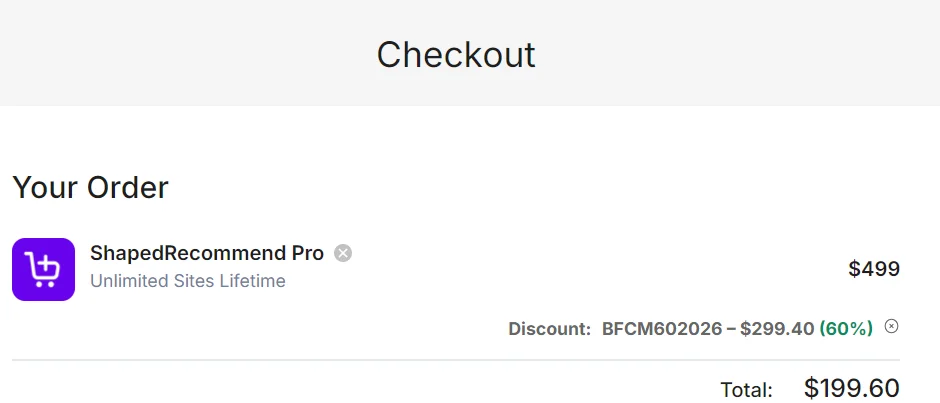
- Check the checkout. The discount line should show BFCM602026 with 60% applied.
- Complete payment. Stripe handles it, with cards and PayPal accepted.
Yearly plans (regular price → sale price):
- Single Site (1 website): $69 → $27.60/year
- 5 Sites: $99 → $39.60/year
- Unlimited Sites: $199 → $79.60/year
Lifetime plans (regular price → sale price):
- Single Site (1 website): $299 → $119.60
- 5 Sites: $399 → $159.60
- Unlimited Sites: $499 → $199.60 (the checkout screenshot shows $299.40 off)
Want more than one plugin? The ShapedPlugin lifetime bundle gives you 9 Pro plugins together. The official page says this is usually cheaper than buying two separately.
What You Actually Get With ShapedRecommend Pro
Think of it as one plugin that decides which product to show, where to show it, and to whom. The product page groups the features into six areas.
Choosing and ranking products. You can set manual rules, use statistics from your real orders, or use “frequently bought together.” Ranking can follow popularity, rating, conversion or freshness. You can also pin specific products, or reuse the up-sells you’ve already set in WooCommerce.
Placing them anywhere. Product page, category and shop pages, cart and empty cart, checkout, thank-you page, and the mini-cart panel. There’s also a block and a shortcode if you want manual control.
Targeting the right shoppers. Rules can depend on cart total, visitor type, device, schedule or the category being viewed. This is what separates it from a basic “related products” widget.
Showing offers your way. Grid, list and carousel layouts, a bundle with one-click add, a single offer card, a popup or slide-in, and the mini-cart panel. The page says it matches your theme’s look.
Keeping offers from stacking. You can block repeated products, limit blocks per page and offers per session, set a priority order, and pick the winner by value or conversion.
Measuring what they earn. Revenue and conversions, orders and items sold, a conversion funnel, revenue by source, revenue by order and a daily sales report.
My Take as a Developer and Store Owner
I’m Karan Rajput. I’ve been blogging for 7+ years and handle WooCommerce and WordPress client work alongside my own niche sites. Here’s how I look at a recommendation plugin.
In WooCommerce projects I’ve handled, the default related products block usually shows items from the same category or tag, and that’s it. It doesn’t care about cart value, device or what the shopper already added. That’s the gap this plugin is trying to fill.
The part I like most is the “keep offers from stacking” group. Stores often add an upsell on the product page, another in the cart and a popup on top. Shoppers get annoyed, and conversions usually suffer. Limiting offers per session and setting a priority order is a smart safeguard.
I haven’t benchmarked this plugin’s front-end output, so I won’t quote any speed numbers. If you install it, this is what I’d check on a staging site first:
- Whether the recommendation blocks load extra JS/CSS on pages where you don’t use them
- Whether carousels and popups shift layout (watch CLS on mobile)
- Whether the cart and mini-cart blocks behave correctly with your theme and cache setup
- Whether it works with your block checkout or classic checkout
Good hosting helps here, since recommendation queries run on your server. If you’re still choosing a host, my Cloudways Black Friday deal and Hostinger Black Friday deal pages cover current offers.
Pro observation: Start with just two placements, say the product page and the cart. Use the analytics (revenue by source and by order) for a week or two, then add more. Turning on every placement at once makes it impossible to tell which one earns.
Yearly vs Lifetime: Which Plan Makes Sense?
The sale cuts 60% from both billing types, so the real question is how long you’ll run the store.
| Point | Yearly | Lifetime |
|---|---|---|
| Updates | 1 year | Lifetime updates |
| Support (Single Site) | Standard support for 1 year | Standard support for lifetime |
| Support (5 Sites, Unlimited) | Priority support for 1 year | Priority support for lifetime |
| Plugin features | All ShapedRecommend Pro features | All ShapedRecommend Pro features |
| Refund window | 14 days | 14 days |
| Sites covered | 1 / 5 / Unlimited | 1 / 5 / Unlimited |
| Best for | Testing it on one store | Stores you’ll run for years |
Winner: Lifetime for a store you plan to keep running. For a store you’re still testing, yearly is the safer start.
Features are identical in both, so you’re only choosing between paying once and paying yearly. If you’re an agency or freelancer handling client stores, the 5 Sites plan is marked as most popular, and Unlimited covers agencies and developers. For a single store, the Single Site plan is enough. Check the official FAQ for what happens when a yearly license ends, since I haven’t tested a renewal.
Where It Falls Short and Who Should Skip It
No plugin fits everyone. Here are the real limits.
- WooCommerce only. If you run a blog, an affiliate site or a non-WooCommerce store, this plugin does nothing for you.
- It needs traffic to pay off. Recommendations from your real order data work better when your store already gets orders. A brand-new store with a handful of sales has little data to rank from.
- There’s a setup learning curve. Targeting rules, priority and stacking limits give you control, but a complete beginner may need time to set them up properly.
- Yearly licenses expire. After the first year, updates and support depend on renewal.
Skip it if: you don’t use WooCommerce, you sell one product only, or your store has barely any traffic. Choose it if: you run a multi-product WooCommerce store and want smarter upsells, cart offers and reporting in one place.
Should You Go for the Lifetime Bundle Instead?
If ShapedRecommend Pro is the only ShapedPlugin product you need, buy it on its own. If you also want sliders, galleries, product categories or quick view for your store, the bundle is worth a look. It covers 9 Pro plugins in one lifetime purchase.
You can compare those related plugins in my Reno Quick View Pro deal and Reno Product Gallery Pro deal posts. For the full list of offers, see the ShapedPlugin Black Friday hub.
What to Do After Buying
Setup steps:
- Install and activate the plugin, then enter your license key.
- Make sure WooCommerce is updated and your cache is cleared.
- Create your first recommendation on the product page or cart.
Key settings to configure:
- Choose a ranking method (popularity, rating, conversion or freshness)
- Set limits for offers per session and blocks per page
- Set a priority order so offers don’t compete
Mistakes to avoid:
- Enabling every placement on day one
- Skipping mobile checks for popups and slide-ins
- Ignoring the revenue reports you’ve paid for
Also: you have 14 days to ask for a refund, so test it on your real store within that window.
ShapedRecommend Pro Black Friday Deal
Deal: Up to 60% Off + Lifetime Plans
Coupon Code: Not needed. The discount is auto-applied at checkout.👇
Frequently Asked Questions
Is the coupon applied automatically?
Yes. The 60% discount appears at checkout without you entering anything. In my checkout screenshot, the discount line shows BFCM602026 with 60% applied. If you don’t see it, reopen the deal link and add the plan again.
How long does the ShapedRecommend Pro Black Friday sale last?
According to the official FAQ, it runs from November 13 until December 11 at 11:59 PM ET. When the sale ends, prices go back to normal. Don’t leave it to the final hours, since checkout slowdowns are common near deadlines.
Does the discount apply to every license?
The pricing page shows 60% off across all six options: Single Site, 5 Sites and Unlimited Sites, on both yearly and lifetime billing. The page also calls it the biggest discount of the year.
Is there a money-back guarantee?
Yes. ShapedRecommend Pro offers a 14-day money-back guarantee. If it isn’t the right fit for your site, contact support within 14 days for a refund. Test it on your real store early so you don’t run out of time.
Which plan should a beginner pick?
If you run one store, start with Single Site. Choose yearly if you’re still testing, or lifetime if you’re sure about the store. Freelancers with a few client stores can look at the 5 Sites plan. Compare the Astra Black Friday deal too if you’re also rebuilding your theme.
Does it work without WooCommerce?
No. ShapedRecommend is built for WooCommerce stores, so it won’t help a regular blog or a non-WooCommerce site. If that’s your setup, skip it and put your budget into something that fits your site.
Final Verdict
ShapedRecommend Pro is a practical pick for WooCommerce store owners who want smarter upsells and cart offers without custom code. The 60% sale is flat across every plan, the coupon applies itself, and the 14-day refund window lowers the risk.
For a single store you’ll keep running, lifetime gives the best long-term value. For testing, go yearly. Non-WooCommerce sites should pass. The sale ends December 11, so grab ShapedRecommend Pro here once you’ve decided on a plan.
Related Posts