Smart Swatches Pro turns boring WooCommerce dropdowns into color, image and button swatches. Right now, every plan carries a 60% discount.
I’m Karan Rajput. I’ve been building WordPress and WooCommerce sites for 7+ years, and variation display is one of those small things that quietly affects conversions.
This page covers how to claim the deal, what the plugin does, where it falls short, and which plan to pick.
Quick Deal Snapshot [🟢STATUS: LIVE NOW]
Starts on: Live now | Ends on: Not officially announced (the official banner says “Ends Soon”)
Deal Active Now
- Discount: 60% off on all Smart Swatches Pro plans, yearly and lifetime
- Yearly plans: from $19.6/year (regular $49)
- Lifetime plans: from $119 one-time (regular $298)
- Includes: All Pro features on every plan, plus a 14-day no-questions-asked refund policy
Coupon: BFCM602026, applied automatically at checkout👇

This post contains affiliate links, and I earn a commission from them at no extra cost to you. Thank you for your support!Quick Answer: The Single Site plan covers one store. The Five Sites plan suits freelancers. The Unlimited Sites plan is for agencies. Lifetime plans include updates and support for life, while yearly plans cover one year. Prices are in USD and exclude VAT.
How to Claim the Smart Swatches Pro Discount
You don’t need to hunt for a code. The discount is auto-applied, and here’s how it worked when I went through checkout.
- Open the Smart Swatches Pro offer page so the sale pricing loads.
- Use the Yearly / Lifetime toggle above the plans and choose your billing style.
- Click Buy Now on the plan that matches your site count.
- At checkout, look for the discount line. It showed BFCM602026 with 60% taken off.
- If the discount line is missing, type the code in manually and re-check the total.
- Pay and download the plugin from your account.
Here are the sale prices shown on the official page:
| Plan | Best for | Yearly (regular → sale) | Lifetime (regular → sale) |
|---|---|---|---|
| Single Site | Individuals | $49 → $19.6 | $298 → $119 |
| Five Sites | Small business and freelancers | $99 → $39.6 | $498 → $199 |
| Unlimited Sites | Agencies and developers | $199 → $79.6 | $798 → $319 |
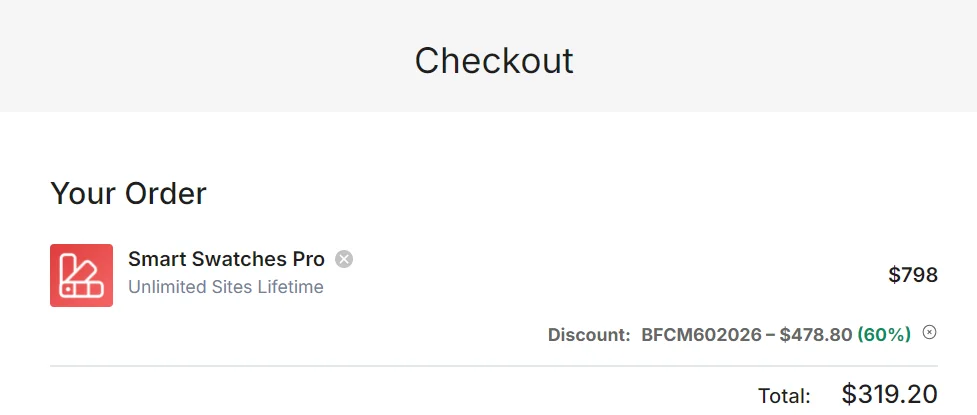
In my checkout screenshot, the Unlimited Sites Lifetime plan came to $319.20 after a $478.80 discount. That’s a few cents above the displayed $319, so expect small rounding differences.
What You Actually Get
Smart Swatches Pro has one job: make variable products easier to choose from. WooCommerce’s default dropdowns work, but they hide the options. Swatches put them in front of the buyer.
Here’s what stood out in the feature list:
- Swatch types: color, image, button/label, and dual-color swatches.
- Auto-conversion: dropdowns can become button or label swatches automatically, or image swatches when a variation has a featured image.
- Shop and archive pages: you get 4 swatch positions, a display limit, and a one-click option to apply product page styles to the shop page.
- Quick view popups: swatches show up there too.
- Tooltips: 3 types (text, image, text and image), with animation.
- Display styles: slider, accordion, vertical scrollbar and horizontal scrollbar.
- Out-of-stock handling: swatches can be disabled, or shown with a cross, blur or grayscale effect.
- Stock info: variation stock is displayed on the product page.
- Activation: swatches can trigger on click or mouseover.
The out-of-stock styling is more useful than it sounds. Nothing frustrates a shopper more than clicking a size and discovering it’s gone.
A Developer’s Take: Speed, Compatibility and Clean Code
Any plugin that changes the product page deserves a performance check before you ship it.
In a WooCommerce client project I worked on, the real issue with swatches wasn’t the product page. It was the shop page. Swatches on archive pages add extra markup to every product card, so a catalog with lots of variable products gets heavier. If you enable that feature, check your layout shift and LCP before and after.
A few things I’d look at on any swatch plugin:
- CSS bloat: Smart Swatches Pro has an option to disable its default stylesheet. That’s a developer-friendly touch, because you can restyle swatches from your theme and skip unused CSS.
- Ajax variations: WooCommerce switches to Ajax loading when a product has many variations. The plugin lets you change that default threshold, which helps on products with big variation sets.
- Shareable URLs: it can generate a URL based on the selected variation attribute, which is handy for linking straight to a color.
On compatibility, the official page lists Gutenberg, Elementor, Divi, WPBakery, Avada, XTheme, BeTheme, Astra, Woostify and OceanWP. It also supports WPML, Polylang, Loco and qTranslate for multilingual stores. It integrates with WooCommerce itself and works with the default WooCommerce exporter and importer.
Pro tip: use the custom swatch settings for individual products only on your top sellers. Global styling is faster to manage and keeps things consistent.
Yearly or Lifetime: Which Plan Fits?
The 60% discount applies across the board, so the choice comes down to how long you’ll use it.
Yearly plans include support and automatic updates for 1 year. They’re a lower upfront cost and suit a store you’re still testing. Lifetime plans include support and automatic updates for life. If your store has been running for a while and isn’t going anywhere, lifetime is the better value.
Now the site count:
- Single Site: one store, with standard support.
- Five Sites: the popular pick for freelancers, with priority support.
- Unlimited Sites: agency use, also with priority support.
Is there a hidden charge? Prices exclude VAT, and the amount is calculated at checkout based on your billing country. You’ll see the full total before paying. The official page also says you can change plans or cancel your account anytime. Check the official site for renewal terms on yearly plans.
Where It Falls Short
No plugin is perfect, so here’s what to know before buying.
- WooCommerce only. If your store doesn’t use variable products, this plugin does nothing for you.
- Standard support on Single Site. Priority support starts at the Five Sites plan.
- Yearly access expires. Once the year ends, updates and support stop unless you renew.
- Extra work on big catalogs. Swatches on shop pages need a performance check.
Who should skip it:
- Stores selling only simple products
- Anyone happy with default dropdowns who has no variation-heavy products
- Sites where every CSS and JS file is a performance battle and you don’t plan to test
Is This the Lowest Price?
I can’t verify the plugin’s price history, so I won’t claim a record low. What I can say is that this 60% off is the sale shown on the official page right now, and the banner says it ends soon. Don’t plan around a repeat. Pricing may change, so check the official site before paying.
If you’re also eyeing other ShapedPlugin tools, the ShapedPlugin Black Friday deal page covers the wider range, and there’s a lifetime bundle option worth checking if you want more than one plugin.
What to Do After Buying
Don’t just install and activate. Do this instead:
- Test on staging first. Activate on a staging copy and check your variable products.
- Configure attributes. Set each attribute’s swatch type (color, image or button) under your product attributes.
- Pick shop page behavior. Start with the one-click option to apply product page styles, then adjust positions.
- Set out-of-stock styling. Choose the cross, blur or grayscale effect.
- Check on mobile. Tooltips and mouseover activation behave differently on touch screens, so click activation is usually safer there.
- Measure. Run a speed test before and after.
Mistakes to avoid:
- Enabling every feature at once
- Using huge images as image swatches
- Skipping the mobile check
- Forgetting to test with your page builder

Smart Swatches Pro Black Friday Deal
Deal: Up to 60% OFF
Coupon Code: BFCM602026, applied automatically at checkout👇
Frequently Asked Questions
Is the Smart Swatches Pro coupon applied automatically?
Yes. In my checkout, the BFCM602026 discount appeared on its own as 60% off. If your cart shows no discount line, enter the code manually before paying. Always confirm the final total at checkout, since pricing may change.
Which plan is best for beginners?
If you run one store, the Single Site plan covers everything, since all plans include all Pro features. Pick yearly if you want a lower upfront cost, or lifetime if you plan to keep the store long term.
Prices are in USD and exclude VAT. The VAT amount is calculated at checkout from your billing country, and the total is shown before payment. Check the official site for yearly renewal terms.
Is there a refund policy?
Yes. The official page offers a 14-day no-questions-asked refund policy, so you can test the plugin on your store with limited risk. Read the full refund policy on the official site before buying.
Does it work with Elementor and other page builders?
The official compatibility list includes Elementor, Divi, WPBakery and Gutenberg, plus themes like Astra, Avada and OceanWP. Still, test on staging first. If you also want product extras, see our ShapedPlugin deal page.
Do lifetime plans include updates and support?
Yes, according to the pricing page. Lifetime plans list automatic updates for lifetime, and support too (standard on Single Site, priority on Five Sites and Unlimited Sites). Yearly plans cover one year of each.
Final Verdict
If you run a WooCommerce store with variable products, Smart Swatches Pro is a practical upgrade over default dropdowns, and the 60% discount makes this a good time to buy.
For a single store, go with Single Site. For freelancers managing several client stores, Five Sites is the sensible middle. For agencies, Unlimited Sites Lifetime gives the most value. If your store has no variable products, skip it.
Ready to try it? You can grab Smart Swatches Pro here while the sale is live. The refund policy gives you 14 days to test it properly.
Related Posts