Jetpack’s Black Friday sale is live, and there’s no coupon to hunt for. The 50% discount applies automatically to the first year of both the Pro and Complete plans.
Below you’ll find what the deal covers, how to claim it, and which plan fits your site. I’ve also flagged the catch: the discount applies to year one only.
The sale ends December 2.
Quick Deal Snapshot [🟢STATUS: LIVE NOW]
Starts on: Live now | Ends on: December 2
Jetpack is taking 50% off the first year of its paid plans.
- Discount: 50% off the first year, applied automatically
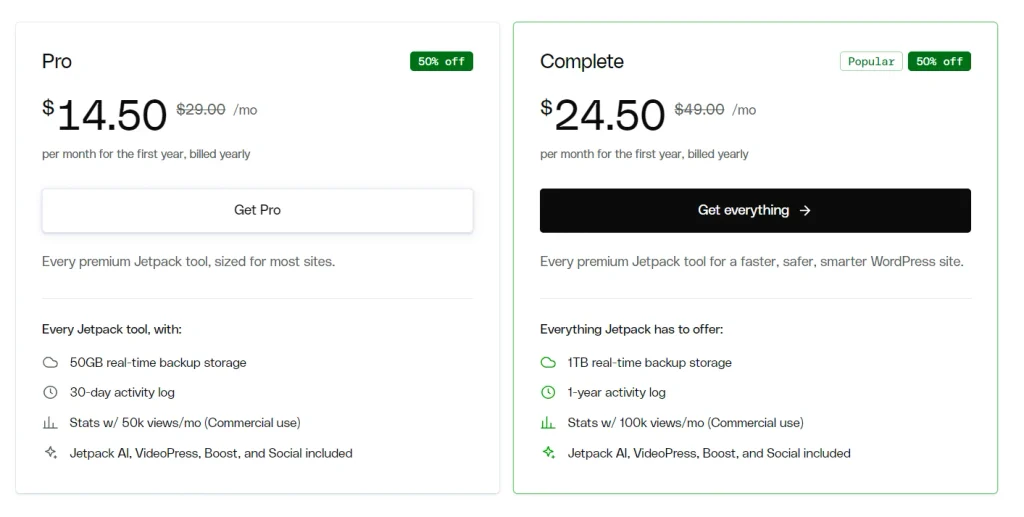
- Pro: $14.50/mo (regular $29.00/mo), billed yearly for the first year
- Complete: $24.50/mo (regular $49.00/mo), billed yearly for the first year
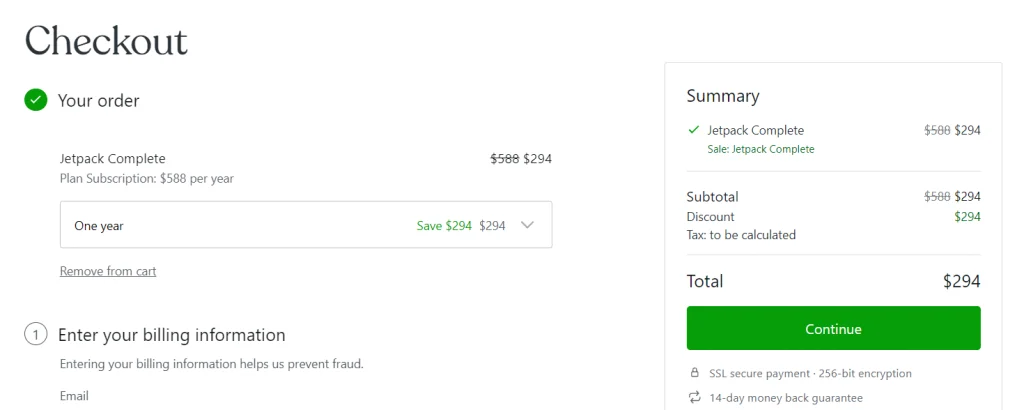
- Checkout example: Complete shows $588 crossed out and $294 payable for one year (tax calculated at checkout)
- Renewal: Renews at the regular price after year one
- Guarantee: 14-day money-back guarantee shown at checkout
Coupon: No promo code is needed. 👇

This post contains affiliate links, and I earn a commission from them at no extra cost to you. Thank you for your support!Quick Answer: For one business site that needs real-time backups and malware scanning, Pro is the sensible pick. Choose Complete if you need 1 TB of backup storage, a 1-year activity log, or higher Stats and Search limits. The sale ends December 2, and it covers the first year only.
How to Claim the Jetpack 50% Off
You don’t need a code, so this is quick.
- Open the Jetpack pricing page through this link. The Black Friday banner at the top confirms the sale is active.
- Pick your plan. The cards show Pro at $14.50/mo (crossed-out $29.00) and Complete at $24.50/mo (crossed-out $49.00). Both are billed yearly for the first year.
- Check the checkout summary. The discount is already applied. In the example I saw, Jetpack Complete dropped from $588 to $294 for one year, with “Save $294” shown next to it. Tax is added after you enter billing details.
- Enter your email and billing details. Use an email you’ll keep, since it’s tied to your account later.
- Connect the plan to your site. You’ll need a WordPress.com account for the connection. It takes a few minutes.
Prices may change, so confirm the numbers on the official page before paying.
What the Discount Actually Covers
The sale is 50% off year one on the paid plans. Renewal moves to the regular price, which is the crossed-out one on the pricing page.
If you’re buying for a site that will still matter in 2027, budget for the full price from the second year. A first-year discount is nice, but it isn’t what you’ll pay long term.
One more timing detail: the pricing page says the Jetpack AI agent connection (ChatGPT, Claude or another MCP agent) is free until November 30. That’s separate from the sale, but it’s a small reason to look at Jetpack this week.
Pro or Complete: Which Plan Is Worth the 50% Off?
I’d decide on limits, not features. Both plans include Jetpack AI, VideoPress, Boost and Social. What changes is how much headroom you get.
| What you’re comparing | Free | Pro | Complete |
|---|---|---|---|
| Backups | – | Real-time, 50 GB storage | Real-time, 1 TB storage |
| Activity log | – | 30-day | 1-year |
| Stats (commercial sites) | Personal sites only | 50k views/mo | 100k views/mo |
| Akismet spam protection | – | 10k API calls/mo | 60k API calls/mo |
| Jetpack Search | 5k records, 500 requests/mo | 10k records, 10k requests/mo | 100k records, 100k requests/mo |
| Payment transaction fees | 10% | 2% | 2% |
| Best for | Personal blogs, testing | Single business site or small blog | Large media sites, WooCommerce stores, agencies |
Free column shows “–” only where the pricing page lists nothing for that feature. Activity log wasn’t listed for Free.
What this means in practice: Pro covers most small business sites and blogs. Complete makes sense when your site has a big media library, heavy comment or form traffic, or a large searchable catalogue. The jump from 50 GB to 1 TB of backup storage is the clearest sign you’re in Complete territory.
Free has a catch for anyone monetising a site. Stats on Free are for personal sites only, so a commercial site needs a paid plan for that.
What You Get: Security, Speed and Growth Tools
I’m Karan Rajput, and after 7+ years of blogging and client WordPress work, I look at Jetpack the same way every time: does it replace several separate plugins, or does it just add another one to maintain?
Security. Pro and Complete both include real-time backups, real-time malware scanning with 1-click fixes, and automatic firewall rules. The free plan only offers manual firewall rules and no automated backups. That gap is the main reason to upgrade.
Performance. Jetpack Boost handles automated critical CSS, which targets LCP, CLS and INP. Free is manual. From a performance standpoint, that’s useful because render-blocking CSS is one of the most common causes of a slow first paint on page-builder sites.
Growth. Advanced stats cover UTM tracking, devices, locations and trend reports. Jetpack Social adds advanced sharing (custom media and templates). Search is typo-tolerant with filters.
Pro observation: the payment fee drops from 10% on Free to 2% on paid plans. If you collect payments or subscriptions through Jetpack, that alone can offset a good part of the plan cost.
On a client site, I’d test Boost on a staging copy first, especially with Elementor or WooCommerce, because automated CSS can sometimes behave differently with heavy layouts.
Where It Falls Short (and Who Should Skip It)
Pros
- Real-time backups and malware scanning sit in one plan with a single dashboard.
- Automated critical CSS through Boost can help LCP and CLS without hand-tuning.
- 50% off year one makes the entry cost much lower.
- 2% payment fees on paid plans, versus 10% on Free.
Cons
- The discount is first-year only, and renewal returns to the regular price.
- Backup storage is capped at 50 GB on Pro, which can fill up on media-heavy sites.
- You need a WordPress.com account to connect, which some people dislike.
- Stats, Search and Akismet each have monthly caps, so busy sites can hit limits.
Who should skip it:
- Anyone whose host already provides daily backups and malware scanning and is happy with them.
- Hobby sites with no commercial use, where Free is enough.
- People who want one-time or lifetime pricing. Jetpack’s deal here is a yearly subscription.
Is This the Lowest Price?
I can’t verify how deep earlier Jetpack sales went, so I won’t claim a historical low. What I can say is that 50% off is the discount shown on the official pricing page today, and no code is needed.
If you’re still undecided, the deadline is December 2. After that, pricing may revert, so check the official site.
Jetpack vs Other Ways to Cover the Same Ground
You have two realistic alternatives:
- A separate plugin stack for backups, security, caching and stats. It gives you more control, but means more plugins, more updates and more places for conflicts. I wouldn’t recommend this unless you want to tune each piece.
- Host-level protection. Some hosts bundle backups and basic security. If you’re shopping for hosting anyway, check our Cloudways Black Friday deal or Bluehost Black Friday deal. Even with host backups, I still prefer an off-site copy.
Decision rule: if your host gives you daily backups you trust, go with Free or Pro. If you want everything in one place, Complete is the cleaner setup.
What to Do After Buying
- Connect the site and confirm the plan is active in your dashboard.
- Run the first backup and check that a restore point appears.
- Run a malware scan and review anything it flags.
- Enable Boost on a staging copy first, then check key pages for layout shifts.
- Set up Social if you publish regularly. Connect your accounts once and let new posts share automatically.
Mistakes to avoid: don’t enable every module at once, and don’t skip a test restore. A backup you’ve never restored is just a hope.
Jetpack Black Friday Deal
Deal: Up to 50% Off
Coupon Code: 50% off the first year, applied automatically👇
Frequently Asked Questions
Do I need a coupon code for the Jetpack Black Friday deal?
No. The 50% discount is applied automatically at checkout. In the checkout summary I saw, the sale price was already deducted from the plan before I entered any billing details.
Does the 50% off apply every year?
No. The banner says it’s 50% off your first year, and the plan renews at the regular price. If you plan to keep it long term, factor in the full price from year two.
Which plan should a beginner pick?
Pro is enough for most small business sites and blogs. It includes real-time backups, malware scanning, Boost and Social. Move to Complete only if you need 1 TB of backup storage or higher Stats and Search limits.
When does the sale end?
The Jetpack banner says it ends December 2. Pricing may change after that, so check the official site before buying.
Is there a money-back guarantee?
The checkout page shows a 14-day money-back guarantee. Read the refund terms on the checkout page before you pay.
Where can I compare other Black Friday WordPress deals?
If you’re also buying hosting, see our Hostinger Black Friday deal for another option.
Final Verdict
Jetpack’s 50% off is a solid entry price for real-time backups and malware scanning. For most small sites, Pro is the better value. For larger sites with heavy media and traffic, Complete is the plan that won’t run out of room.
Just remember that the discount is year one only, and the sale ends December 2. If Jetpack fits your setup, you can claim the Jetpack Black Friday deal here before it ends.
Related Posts