Smart Brands Pro helps WooCommerce stores show brand logos, brand pages, and brand filters. Its Black Friday sale is running now.
All three plans are 60% off, and lifetime licenses are included. The discount applies automatically at checkout.
Below: the live prices, how to claim them, and who should skip this plugin.
Quick Deal Snapshot [🟢STATUS: LIVE NOW]
Starts on: Already live | Ends on: Very Soon
60% off every Smart Brands Pro plan, yearly or lifetime. The discount applies automatically at checkout.
- Discount: 60% off on Single Site, Five Sites, and Unlimited Sites
- Lifetime Unlimited Sites: $319 (regular $798), checkout total $319.20
- Yearly Single Site: $19.6/year (regular $49)
- Code: BFCM602026, shown at checkout
- Refund: 14-day money-back guarantee
Coupon: Not needed. The discount is auto-applied at checkout. 👇

This post contains affiliate links, and I earn a commission from them at no extra cost to you. Thank you for your support!Quick Answer
If you run a WooCommerce store that sells branded products, the Black Friday sale is a good time to buy. The discount is the same 60% on every plan. The real choice is yearly or lifetime, and how many sites you need to cover. If you sell unbranded or handmade products, skip it.
How to Claim the Smart Brands Pro Discount
Claiming takes about two minutes, and the discount applies by itself.
- Open the official pricing page through this link. The 60% badge shows on every plan.
- Pick Yearly or Lifetime with the toggle at the top of the pricing cards.
- Choose your plan by how many sites you need.
- Check the checkout. The code BFCM602026 should already be applied. If the discount line is missing, enter the code manually.
- Confirm the total before paying.
Here are the prices as shown on the official page:
Yearly plans
- Single Site: $19.6/year (regular $49)
- Five Sites: $39.6/year (regular $99)
- Unlimited Sites: $79.6/year (regular $199)
Lifetime plans (one-time payment)
- Single Site: $119 (regular $298)
- Five Sites: $199 (regular $498)
- Unlimited Sites: $319 (regular $798)
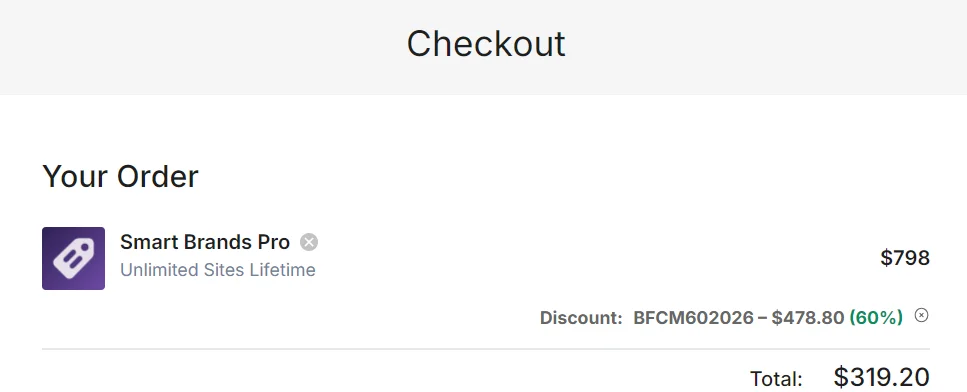
I opened the Unlimited Sites Lifetime checkout, and the discount line showed 60% off with the final total at $319.20.
Prices are in USD, and payments go through Stripe and PayPal. Sale terms can change, so check the official site before you pay.
What You Actually Get With Smart Brands Pro
Brand management
- Unlimited brands, with parent and child hierarchy
- Each brand gets a name, slug, description, logo, and banner
- You can assign more than one brand to a product
Display layouts
- Standard, ticker, and multi-row carousels
- Grid, list, inline, and A-Z filter layouts
- Brands in a sidebar or widget
- A stock counter, with an option to hide empty brands
Brand pages
- Every brand gets its own page automatically
- An “All Brands” index page
- Banners on brand archive pages
- A brand tab on product pages
Ajax brand filters
- Alphabetic filter and a brand search bar
- A filter widget and a “sort by brand” option in the shop
Customization
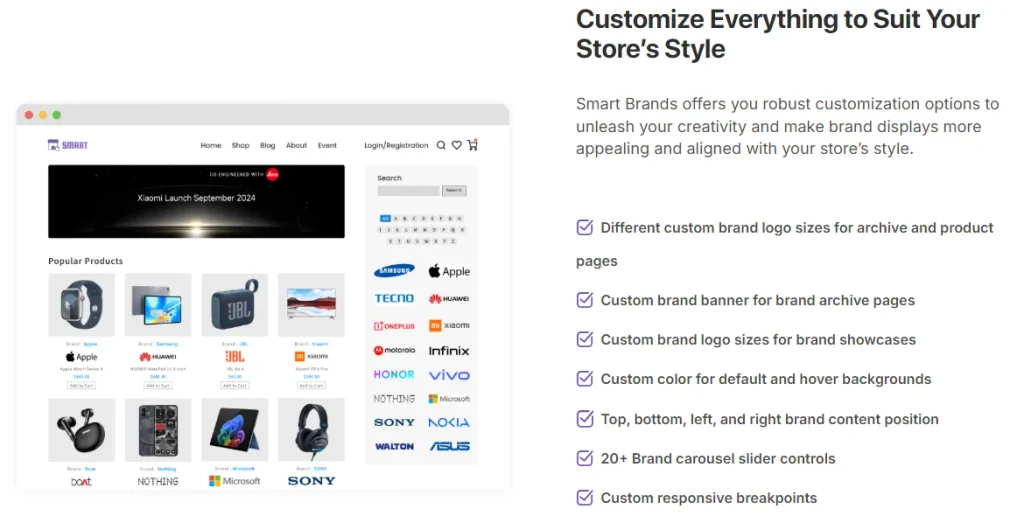
- Logo sizes, colors, and hover backgrounds
- Brand content at the top, bottom, left, or right
- 20+ carousel controls and custom breakpoints
- 900+ Google fonts and custom CSS
A Developer’s Take: Where It Helps and What to Check
From a store owner’s view, brand pages are a quiet SEO win. People search for “Sony headphones” or “Nike running shoes,” and a proper brand archive gives that search a page to land on. Brand filters also help shoppers narrow results faster. Normally you would build this with custom taxonomies and template edits, so a plugin saves real time.
In a client WooCommerce project I worked on, brand logos on product pages were the first thing store owners asked about. They want shoppers to see the brand name without clicking.
From a performance standpoint, carousels and tickers usually load extra JavaScript. Before going live, I would check three things in DevTools:
- Does the slider script load only on pages that show brands?
- Does the carousel container reserve its height, so it doesn’t shift the layout (CLS)?
- Is the carousel placed above the fold on key pages, where it could hurt LCP?
Pro tip: A carousel at the bottom of a page costs less than one high on the homepage. Put the grid or A-Z layout on a dedicated Brands page and keep the homepage carousel small.
Compatibility is broad on paper. The official page lists Gutenberg, Elementor, Divi, and WPBakery, plus themes like Astra, Avada, BeTheme, and OceanWP. It also lists WPML, Polylang, Loco, and qTranslate for multilingual stores. If you use a page builder like Elementor or a theme like Astra, test on staging first anyway.
Where It Falls Short
Pros
- Flexible layouts: carousel, ticker, grid, list, and A-Z options cover most store designs
- Ajax brand filters: shoppers can search and sort by brand without a page reload
- Brand banners and archive pages: useful for stores that want brand-level landing pages
- Wide compatibility: works with Gutenberg and the major page builders and themes
- Lifetime option: a one-time payment covers updates and support, so there is no renewal to track
Cons
- WooCommerce only. It does nothing for a non-WooCommerce site.
- Very few public reviews on the product page. The 5.00 rating rests on only 4 reviews, so treat it as an early signal, not proof.
- Sliders add JavaScript. If you load a carousel on every page, you may see a small hit on page speed.
- Standard support on the Single Site plan. Priority support starts at Five Sites.
- Some brand features have free alternatives. The free version covers basic brand creation. Pro’s clearest gap, per the official comparison, is archive banners, so check the full list before paying.
Do not treat the rating, “72% average sales growth,” and “99% satisfaction” claims on the product page as independent data. They are the vendor’s own numbers.
Which Plan Makes Sense
| Single Site | Five Sites | Unlimited Sites | |
|---|---|---|---|
| Activations | 1 website | 5 websites | Unlimited websites |
| Support | Standard | Priority | Priority |
| Updates | Included for the license term | Included for the license term | Included for the license term |
| Discount | 60% off | 60% off | 60% off |
| Lifetime option | Available | Available | Available |
| Official label | Best Choice for Individuals | Small Business and Freelancers (Popular) | Agencies and Developers |
| Best for | One store, one owner | Freelancers with a few client stores | Agencies and ongoing client work |
The Five Sites plan is tagged “Popular” and is where Priority Support begins. For the same 60% off, it is a fair middle option. Unlimited Sites only pays off if you really have more than five stores. Yearly plans keep the upfront cost low but need renewals. The lifetime plans cost more upfront but stop the renewals.
If you also use other plugins from the same developer, the ShapedPlugin Black Friday deal may be worth a look. There is also a lifetime bundle for stores that want several plugins on one license.
Who Should Buy and Who Should Skip
For a single branded store, go with Single Site (Yearly or Lifetime). It covers brand pages, filters, and carousels without paying for extra activations.
For a freelancer with a few client stores, Five Sites makes more sense. You get Priority Support and enough activations.
For agencies, go with Unlimited Sites Lifetime. One payment covers every client store, and it removes renewal tracking.
Skip it if:
- You sell unbranded, handmade, or single-brand products
- You do not use WooCommerce
- You only need a basic brand label, because the free version may be enough
- You are not sure you need brand pages yet. The 14-day refund window is there, but test the free version first.
What to Do After Buying
- Test on staging first. Install and activate the plugin there, especially if you use Elementor, Divi, or a custom theme.
- Add brands in bulk. Create parent and child brands before assigning products, so the hierarchy stays clean.
- Set a default logo. Brands without a logo should still look consistent.
- Create the Brands page. Use a grid or A-Z layout there, and keep carousels small elsewhere.
- Check page speed. Run PageSpeed Insights before and after, and look at LCP and CLS on key pages.
Mistakes to avoid:
- Putting a large carousel above the fold on every page
- Leaving empty brands visible (use the hide-empty option)
- Skipping the refund window check if something breaks. You have 14 days.
Smart Brands Pro Black Friday Sale
Deal: Up to 60% OFF
Coupon Code: Not needed. The discount is auto-applied at checkout.👇
Frequently Asked Questions
Is the Smart Brands Pro coupon code applied automatically?
Yes, the discount applies automatically at checkout, and the code shows in the order summary. In my Unlimited Sites Lifetime checkout, the 60% discount was already applied. If your cart shows the full price, enter the code BFCM602026 manually before paying.
Does the 60% off apply to lifetime plans?
Yes. The 60% discount shows on all three yearly plans and all three lifetime plans. The lifetime option is a one-time payment, so it is not a subscription. Check the checkout total before paying, because sale terms can change.
When does the Smart Brands Pro Black Friday sale end?
The official page shows a countdown with an “Ends Soon” label. I could not confirm an exact end date, so check the live countdown on the official page before you buy.
Is there a refund policy?
Yes. The official page lists a 14-day money-back guarantee, with no questions asked. If the plugin does not work for your store, ask for a refund within that window. Read the refund policy on the site for exact terms.
Is there a free version of Smart Brands?
Yes. The free version covers basics like unlimited brands, names, descriptions, logos, custom URLs, and brand hierarchy. Pro adds things like banner images for brand archive pages. Compare the full Free vs Pro table on the official page before paying.
Which plan is best for a freelancer?
Five Sites is the most practical option for most freelancers. It covers a handful of client stores and includes Priority Support. If you manage more than five stores, Unlimited Sites works out better, especially on a lifetime license.
Will it work with Elementor or Gutenberg?
The official page says it works with Gutenberg, Elementor, Divi, and WPBakery. It also lists themes such as Astra, Avada, BeTheme, and OceanWP. Compatibility can still vary by setup, so test on a staging site first.
Final Verdict
Smart Brands Pro is worth the 60% sale price if you run a WooCommerce store with branded products. The layouts, brand pages, and Ajax filters save real setup time. The lifetime plans are the better value for agencies and long-term stores.
If you sell unbranded products or don’t use WooCommerce, skip it. If you are unsure, try the free version first and use the 14-day refund window as a safety net.
Ready to buy? Open the official Smart Brands Pro page and confirm the live price at checkout.
Related Posts